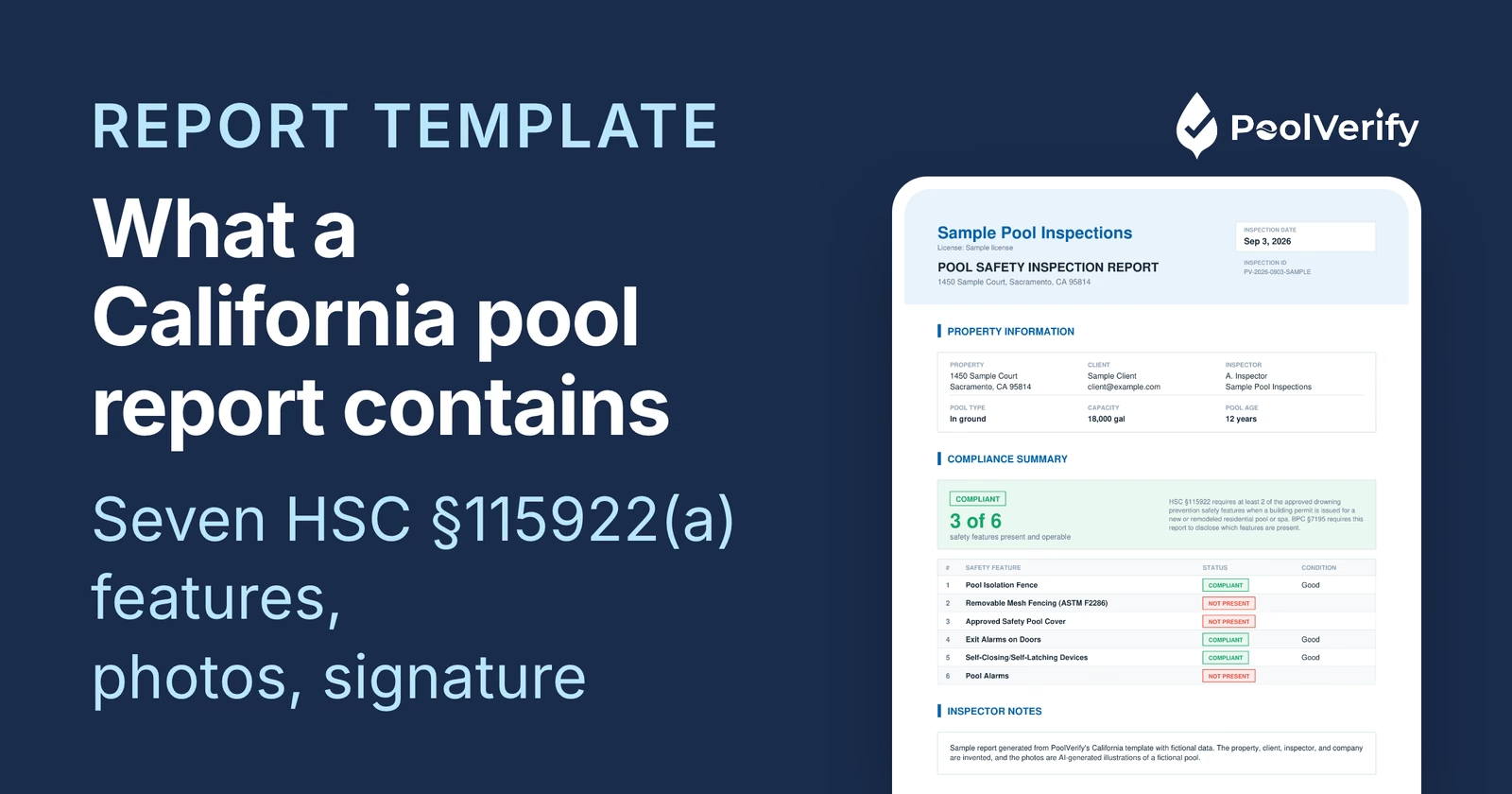
Free California pool inspection report template for SB 442 and BPC §7195 compliance. Includes downloadable PDF template and guide to digital inspection software that saves hours per report.
If you're a California pool inspector, you know the pain: 45 minutes on-site conducting a thorough inspection, then 90 minutes back at the office typing up the report, organizing photos, and generating PDFs.
That's 2+ hours per inspection spent on paperwork instead of income-generating work.
What if you could deliver professional, compliant pool inspection reports in 10 minutes instead of 90?
This guide provides a free downloadable pool inspection report template for California SB 442 and BPC §7195 compliance, plus a breakdown of how modern digital inspection platforms eliminate manual data entry entirely.
Why You Need a Standardized Pool Inspection Report Template
California pool inspectors face unique challenges that generic home inspection templates can't solve:
1. Legal Compliance Requirements
Since January 1, 2018, California law requires:
BPC §7195: Pool Safety Compliance Certificates for property transfers
SB 442 (HSC §115922): Verification of seven specific drowning prevention features
Your report must document compliance with specific legal standards: or your certificates won't be accepted by title companies and escrow officers.
2. Real Estate Transaction Standards
Realtors and escrow officers expect:
Clear pass/fail determination
Specific measurements (gate latch height, fence gaps, clearances)
Photo documentation of key compliance features
Professional formatting for client presentation
Generic checklists don't cut it. You need a template designed specifically for California's legal requirements.
3. Time Efficiency
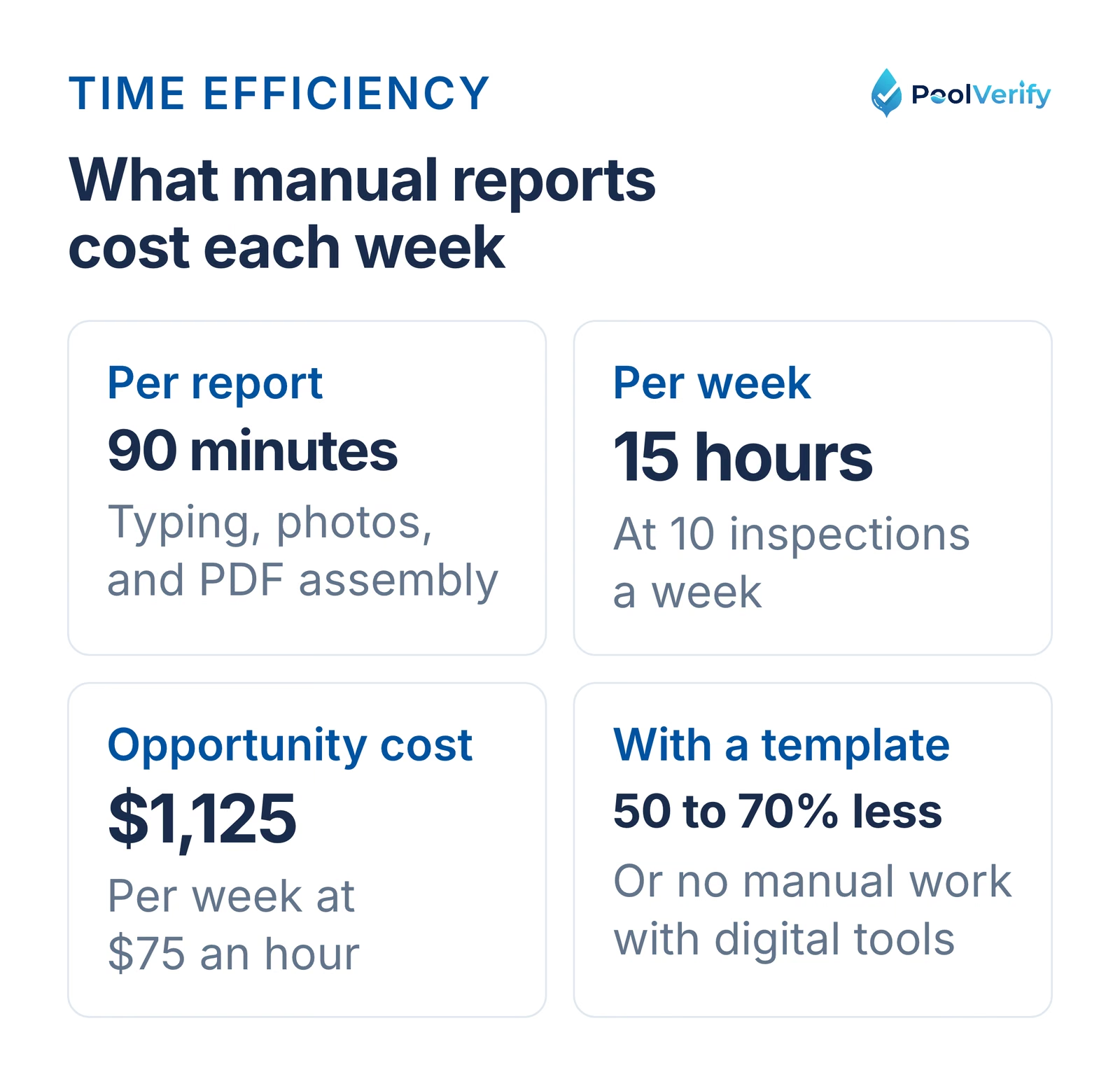
The average pool inspector conducts 8-12 inspections per week. If each report takes 90 minutes to complete:
90 minutes × 10 inspections = 15 hours/week on paperwork
15 hours × $75/hour opportunity cost = $1,125 in lost weekly revenue
A proper template can cut report time by 50-70%: or eliminate manual work entirely with digital tools.
Manual reports at 90 minutes each cost 15 hours and $1,125 a week at 10 inspections and $75 an hour
What Must Be Included in a California Pool Inspection Report
To be legally compliant and accepted by real estate professionals, your pool inspection report must include:
1. Inspector and Property Information
Required Details:
Inspector name and certification credentials (PHTA CPI, CPO, or license #)
Inspection date and time
Property address (street, city, county, ZIP)
Property owner or seller name
Real estate transaction information (if applicable)
Why It Matters: Title companies and building departments verify inspector credentials. Missing certification numbers can invalidate reports.
2. Pool and Spa Identification
Required Details:
Pool type (in-ground, above-ground, spa/hot tub)
Pool dimensions (approximate)
Pool features (diving board, slide, waterfall, etc.)
Pool construction date (if available)
Equipment location and type
Why It Matters: Older pools (pre-2008) have different drain cover requirements. Pool type affects barrier compliance rules.
3. SB 442 Compliance Checklist
The Seven Mandatory Drowning Prevention Features:
Your report must verify at least one of these features is present and compliant:
YesEnclosure with self-closing, self-latching gate
YesExit alarms on doors leading to pool area
YesPool safety cover meeting ASTM F1346 standards
YesRemovable mesh fencing with locking gate
YesAutomatic door locks releasing to outdoors only
YesApproved pool alarm detecting entry
YesOther means approved by local agencies
For Each Feature Present, Document:
Specific measurements (heights, gaps, clearances)
Pass/fail determination
Deficiencies noted
Repair recommendations
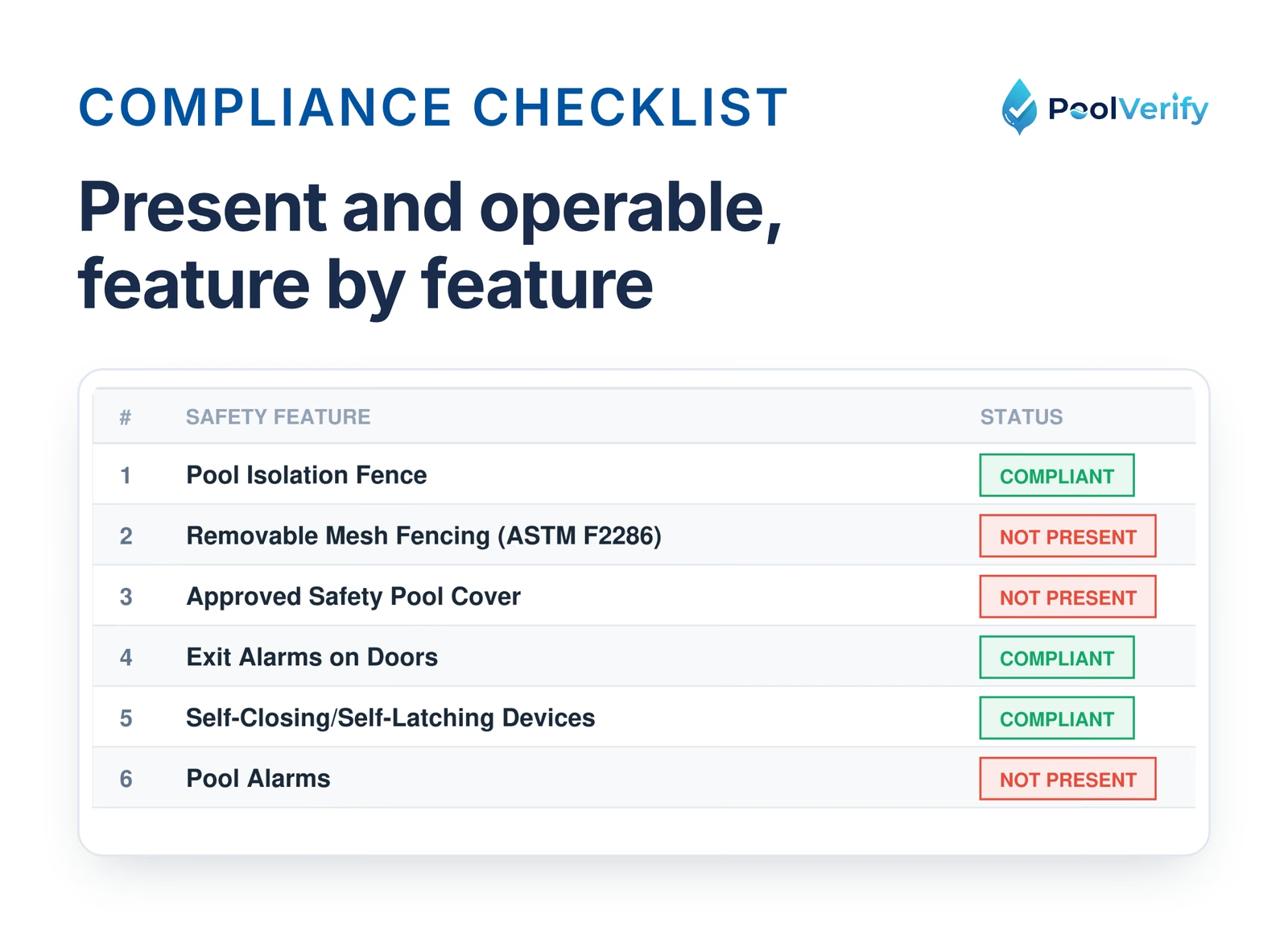
The safety feature table on page 1 of a PoolVerify report, with present and operable columns for each feature
4. Barrier and Gate Requirements (Most Common)
Fence/Wall Checklist:
Minimum 60 inches (5 feet) in height
Maximum 2-inch gaps between vertical slats
Maximum 4-inch clearance from ground to fence
No horizontal climbing members within 45 inches of top
Barrier completely encloses pool area
Gate Requirements:
Self-closing mechanism functional (tested)
Self-latching device at least 60 inches above the ground
Gate opens outward away from pool
No gaps allowing passage when closed
Latch release requires minimum 5 lbs of force
Measurement Documentation:
Fence height: _____ inches
Largest gap between slats: _____ inches
Ground clearance: _____ inches
Latch height: _____ inches
5. Drain Cover and Anti-Entrapment Compliance
Virginia Graeme Baker (VGB) Act Requirements:
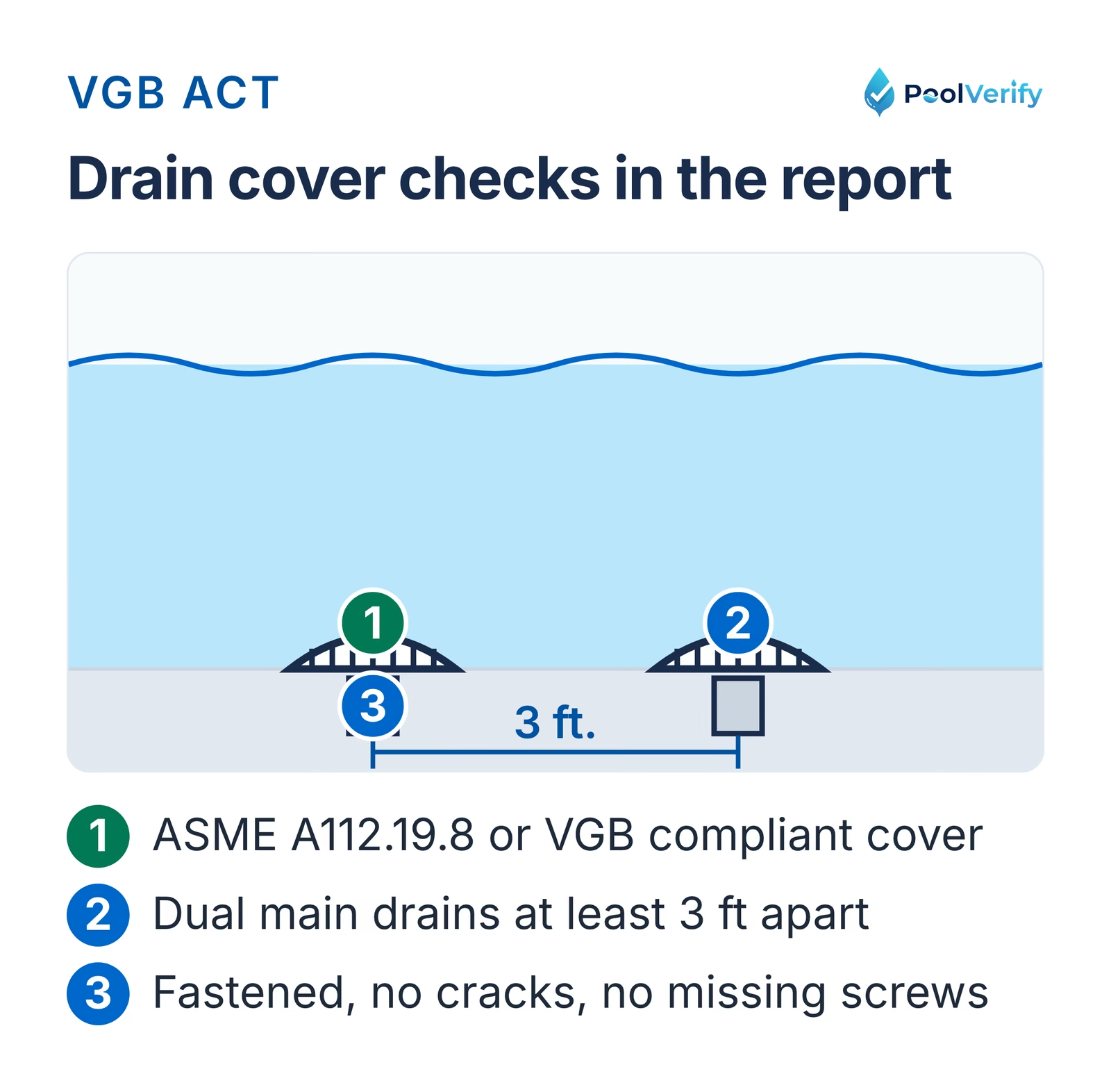
Drain covers meet ASME A112.19.8 or VGB standards
Drain covers securely fastened (no missing screws)
No visible cracks or damage
Dual main drains at least 3 feet apart (if applicable)
Suction outlet flow rate below unsafe levels
Documentation:
Drain cover manufacturer and model
Date stamp on drain cover (if visible)
Number of main drains
Condition assessment
Drain cover checks: VGB or ASME A112.19.8 covers, securely fastened, dual main drains at least 3 feet apart
6. Door and Exit Alarm Verification
If Doors Lead Directly to Pool Area:
Exit alarm present on each door
Alarm sounds at minimum 85 decibels
Alarm activates within 2 seconds of door opening
Keypad override at least 54 inches from floor
Batteries functional (tested)
Testing Documentation:
Alarm brand and model
Decibel level measured: _____ dB
Activation time: _____ seconds
Battery condition: Good / Weak / Dead
7. Pool Equipment Safety
Electrical Safety:
GFCI protection on pool equipment and outlets
Bonding and grounding verified
No exposed electrical wiring
Equipment disconnect switch within sight of pool
Mechanical Safety:
Pump and filter covers intact
No suction entrapment hazards
Skimmer covers secure
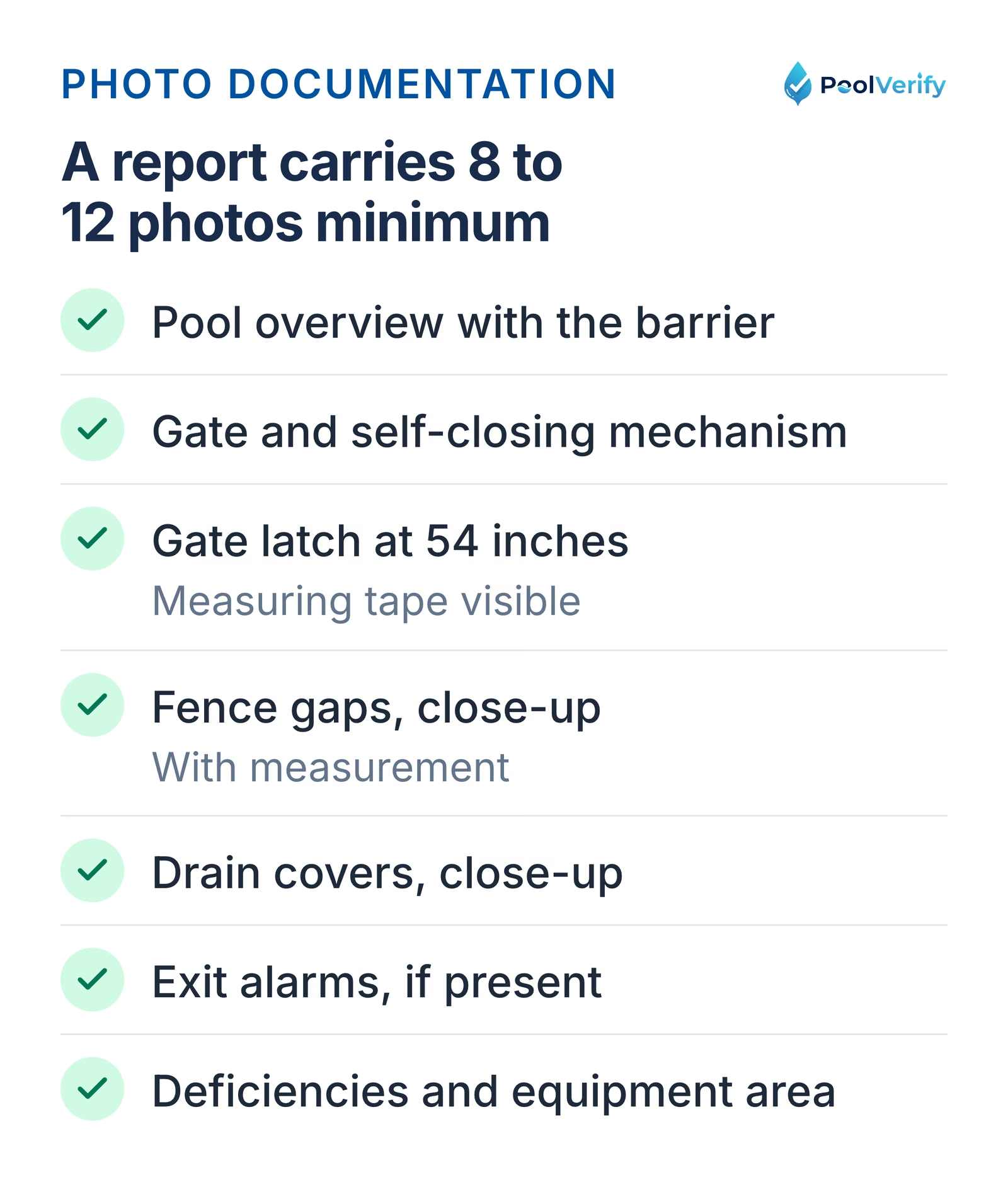
8. Photo Documentation
Required Photos (Minimum 8-12):
Full pool overview showing barrier enclosure
Gate and self-closing mechanism
Gate latch at 60 inches or higher (measuring tape visible)
Fence gaps (close-up with measurement)
Drain covers (close-up showing condition)
Exit alarms (if present)
Any compliance failures or deficiencies
Pool equipment area
Photo Best Practices:
Include measuring tape or ruler in measurement photos
Date/time stamp enabled on camera
Multiple angles of deficiency areas
Before/after photos if repairs made during inspection
The photos a California pool inspection report needs, from the barrier overview to the gate latch with tape visible
9. Compliance Determination
Clear Pass/Fail Statement:
YesPASS: Pool meets SB 442 and BPC §7195 requirements
NoFAIL: Pool does not meet compliance requirements
If Failed:
List all deficiencies
Provide specific repair recommendations
Note approximate repair costs (optional)
Recommend re-inspection timeline
10. Pool Safety Compliance Certificate
Required Certificate Elements:
Official title: "Pool Safety Compliance Certificate"
Statement: "This property has been inspected and [meets / does not meet] the requirements of California BPC §7195 and SB 442"
Inspector signature and date
Inspector certification credentials
Property address
Inspection date
Legal Note: This certificate is the legal document required for real estate transactions. The detailed inspection report supports the certificate but is often not submitted to escrow.
Free Pool Inspection Report Template (Downloadable PDF)
What's Included in the Template
We've created a comprehensive California pool inspection report template that includes:
Yes All SB 442 compliance checklist items Yes BPC §7195 certificate requirements Yes Pre-formatted measurement fields Yes Photo documentation sections Yes Pass/fail determination language Yes Professional formatting for client presentation
How to Use the Template
Step 1: Download and Print
Print 2-3 copies per inspection for on-site use
Bring clipboard and measuring tape
Step 2: Complete During Inspection
Check boxes and fill measurements on-site
Take photos corresponding to checklist items
Note deficiencies in detail sections
Step 3: Transfer to Digital Format
Type handwritten notes into Word/PDF template
Insert photos into designated sections
Generate final PDF report
Step 4: Deliver to Client
Email PDF report within 24-48 hours
Provide signed Pool Safety Compliance Certificate
CC realtor and escrow officer if real estate transaction
Template Limitations
While this free template meets legal requirements, manual report completion has significant drawbacks:
No60-90 minutes per report for data entry and formatting NoPhoto organization is time-consuming (sorting, renaming, inserting) NoHandwriting errors require re-inspection or corrections NoNo automatic calculations for pass/fail determinations NoVersion control issues when forms update NoStorage and retrieval of paper forms and digital files
That's why most California pool inspectors are switching to digital inspection platforms.
The Digital Alternative: Why Pool Inspectors Are Ditching Templates
Modern pool inspection software has revolutionized how California inspectors create reports. Here's what's changed:
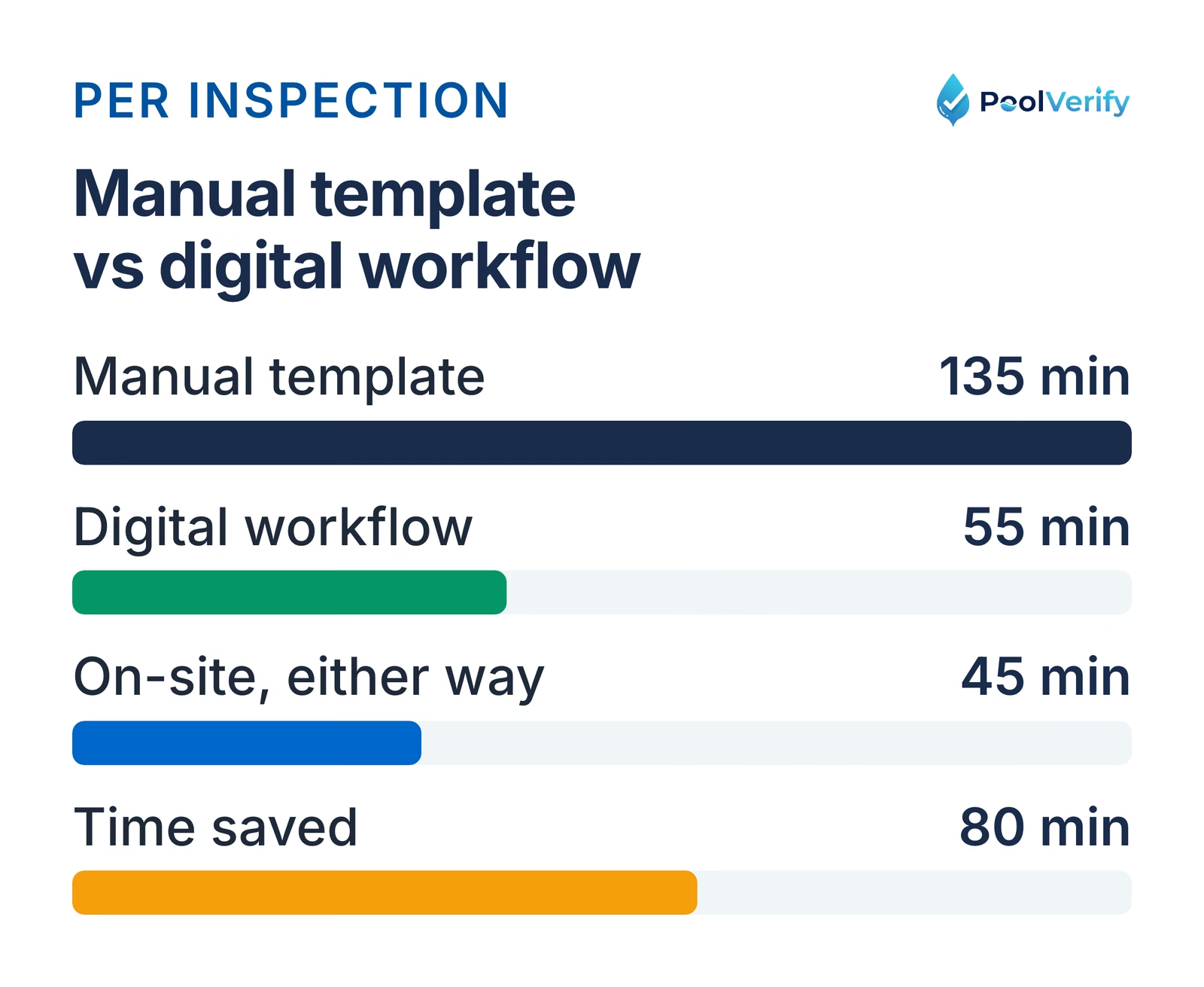
Traditional Template Workflow vs. Digital Workflow
Traditional Manual Workflow (Total: 135 minutes per inspection):
On-site inspection: 45 minutes
Return to office: 15 minutes travel
Transfer handwritten notes to computer: 20 minutes
Download and rename photos from phone: 15 minutes
Insert photos into Word template: 25 minutes
Proofread and format report: 10 minutes
Generate PDF and email to client: 5 minutes
Digital Inspection Workflow (Total: 55 minutes per inspection):
On-site inspection with mobile app: 45 minutes (photos, measurements, checklist in app)
Review and send report: 4 minutes (instant email delivery)
Time Saved: 80 minutes per inspection
At 10 inspections per week, that's 13+ hours saved weekly: equivalent to conducting 2-3 additional inspections.
A manual template workflow takes 135 minutes per inspection, the digital workflow 55, saving 80 minutes
Key Features of Digital Inspection Platforms
1. Mobile-First Data Collection
Check boxes and enter measurements on smartphone/tablet during inspection
Photos automatically tagged to specific checklist items
Timestamp captured automatically on every photo
Every answer saves to the cloud as it is entered
2. Instant Report Generation
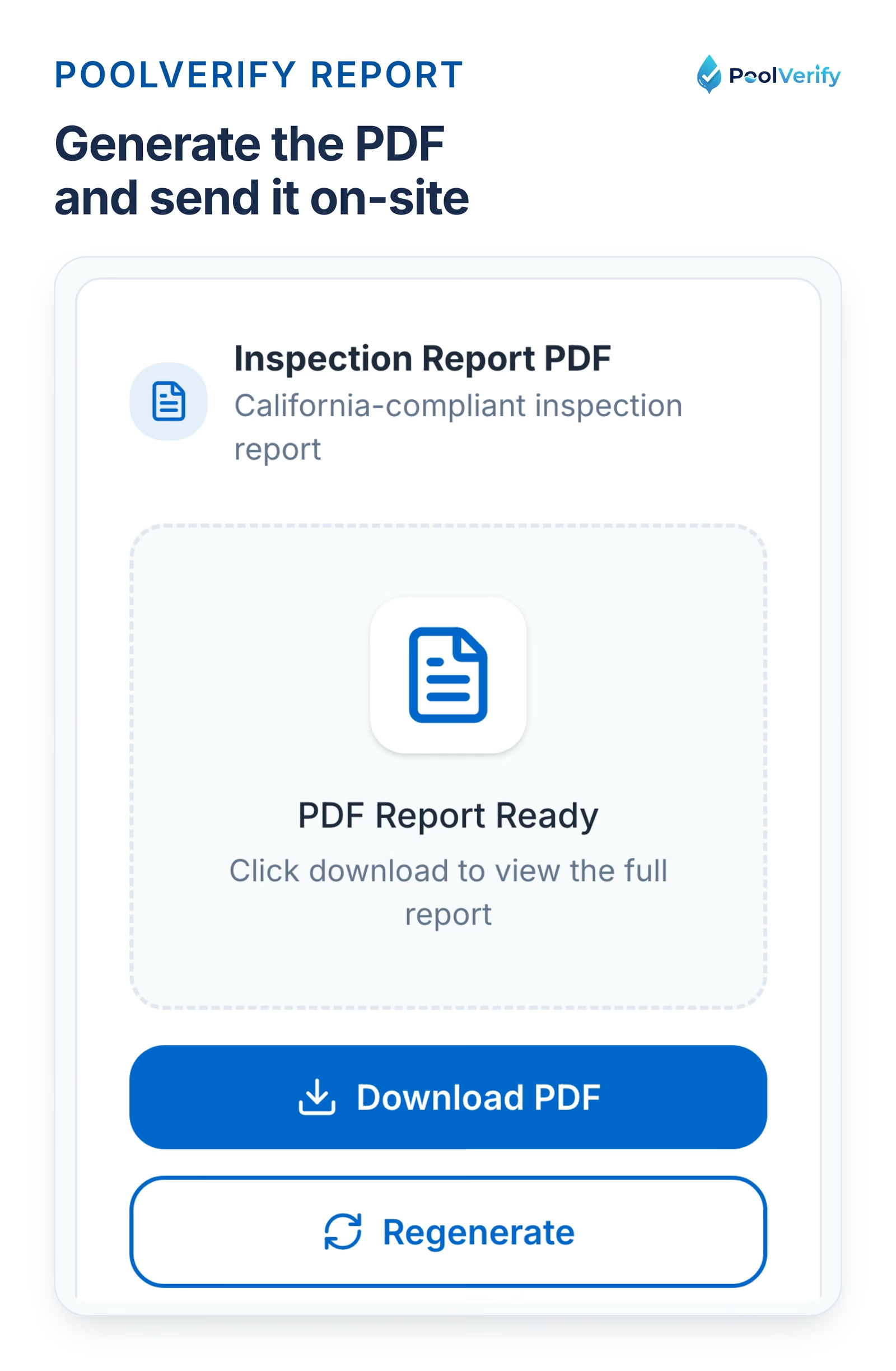
PDF reports auto-generated from inspection data
Photos auto-inserted in correct sections
Pass/fail determined automatically based on criteria
Professional formatting with your logo and branding
3. Built-In Compliance Templates
SB 442 and BPC §7195 checklists pre-loaded
Legal language auto-populated on certificates
No need to track form versions
4. Digital Signatures
Clients sign on phone/tablet or via email link
Legally compliant under California ESIGN Act
Eliminates printing, scanning, and mailing
Instant delivery to escrow and title companies
5. Cloud Storage and Retrieval
All reports stored securely in cloud
Search by address, date, or client name
Instant access to past inspections
Automatic backup (no lost reports)
6. Client Communication
Auto-send reports via email or text
Branded client portals for report access
Automated follow-up reminders for re-inspections
Integration with CRM systems
PoolVerify: The Leading California Pool Inspection Platform
PoolVerify is the only inspection software built exclusively for California pool safety compliance: designed by inspectors who understand BPC §7195 and SB 442 requirements.
Why California Pool Inspectors Choose PoolVerify
Yes California-Specific Compliance
SB 442 drowning prevention checklist pre-loaded
BPC §7195 certificate templates with legal language
Covers the HSC §115922(a) safety features
Yes Instant Report Generation
Complete inspections in 45 minutes with mobile app
Generate professional PDF reports in 60 seconds
Deliver reports while still on-site (impress clients)
No manual data entry or photo organization
Yes Real Estate Transaction Ready
Pool Safety Compliance Certificates auto-generated
Direct email delivery to escrow and title companies
Digital signature capture from realtors and sellers
Meets all title company documentation requirements
Yes Mobile-First Design
Works on any smartphone or tablet (iOS and Android)
Saves as you go, with photos compressed for weak cell service
Photo tagging to specific compliance items
GPS location and timestamp for verification
Yes Professional Branding
Add your company logo to all reports
Customize report colors and formatting
Branded client portal for report access
Professional presentation builds trust
Yes Time Savings That Increase Revenue
Reduce report time from 90 minutes to 10 minutes
Conduct 2-3 additional inspections per week
Increase weekly revenue by $500-$1,000
Eliminate late-night report writing sessions
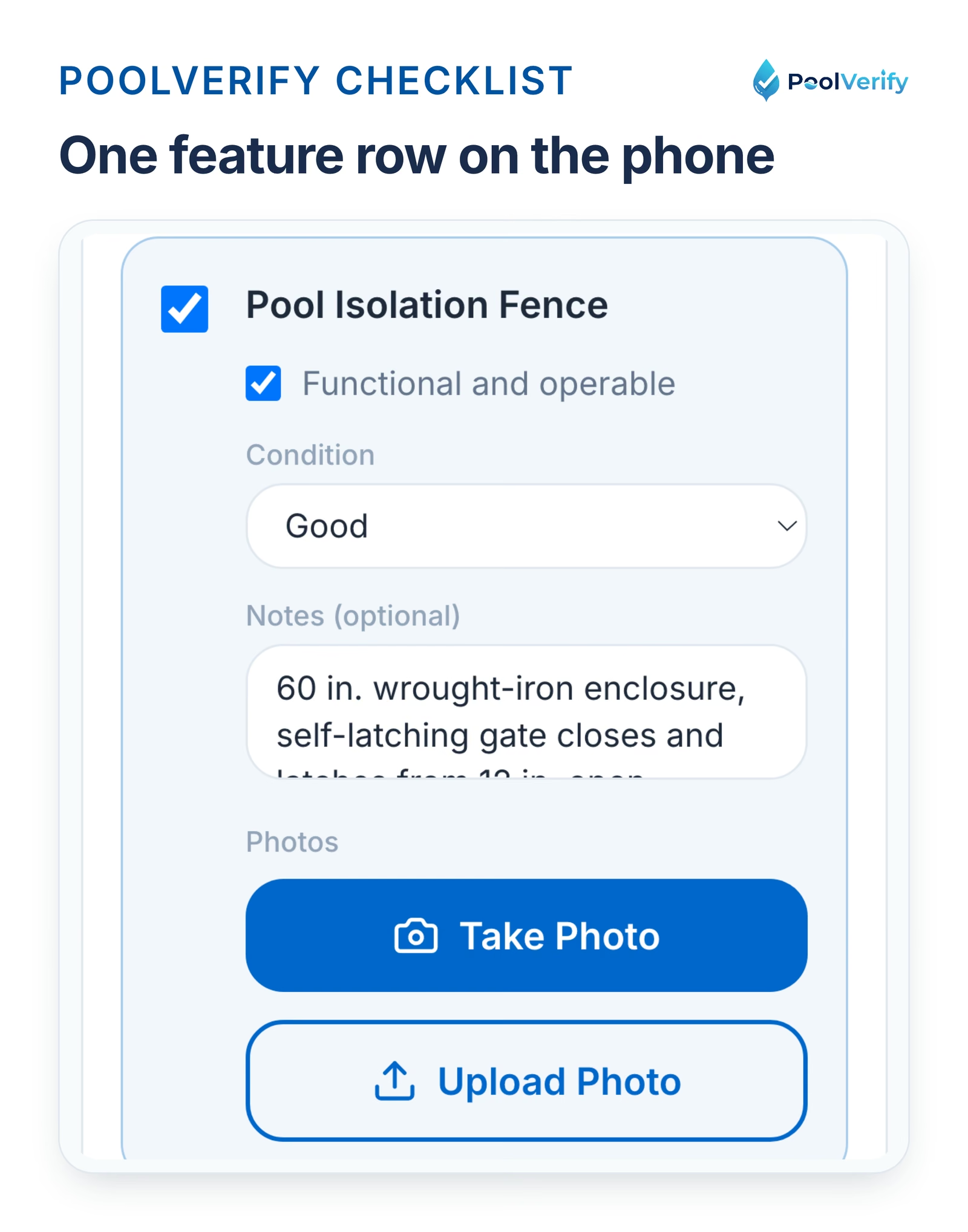
One HSC §115922 feature row in PoolVerify on a phone: present, operable, condition, notes, and photo buttons
Pricing That Pays for Itself
PoolVerify Pricing (annual billing; monthly billing is $49, $99, and $199):
Starter: $39/month (25 inspections a month, one inspector)
Fix: State clearly: "This property PASSES inspection" or "This property FAILS inspection and requires repairs."
6. Outdated Template Forms
Mistake: Using old templates that don't include current SB 442 requirements.
Impact: Missing required checklist items can invalidate certificates for real estate transactions.
Fix: Update templates annually or use digital platforms with automatic regulation updates.
How to Customize the Pool Inspection Template for Your Business
Branding and Professional Presentation
Add Your Company Information:
Business name and logo (top of first page)
Contact information (phone, email, website)
Certification credentials prominently displayed
Business license number
Visual Branding:
Use brand colors for headers and dividers
Professional fonts (Arial, Calibri, or Times New Roman)
Consistent formatting throughout document
High-resolution logo (avoid pixelation)
Additional Sections to Consider
1. Executive Summary
One-paragraph overview of inspection findings
Quick pass/fail status
Most critical issues highlighted
Ideal for busy realtors and clients
2. Repair Cost Estimates
Approximate costs for each deficiency
Helps clients budget for compliance
Builds trust and demonstrates expertise
Include contractor referrals (with disclaimer)
3. Maintenance Recommendations
Tips for maintaining compliance post-inspection
Seasonal pool safety reminders
Equipment maintenance schedule
Builds long-term client relationships
4. Educational Resources
Links to California pool safety laws
Homeowner safety tips
Child drowning prevention information
Positions you as trusted authority
5. Re-Inspection Scheduling
Clear instructions for requesting re-inspection
Timeline expectations (3-5 business days after repairs)
Re-inspection fee disclosure
Contact information for scheduling
State and Local Variations in California Pool Inspection Requirements
While SB 442 and BPC §7195 apply statewide, some cities and counties have additional requirements your template should accommodate:
Los Angeles County
Additional Requirements:
Building department verification for major repairs
Stricter enforcement of electrical code compliance
May require separate permit for fence modifications
Template Addition: Include checkbox for "Building Department Approval Required" in deficiency section.
San Diego County
Additional Requirements:
Hillside property erosion control documentation
Some cities require 72-inch fence height (vs. 60 inches statewide)
Enhanced chemical storage regulations
Template Addition: Variable fence height field that adjusts based on location.
Orange County
Additional Requirements:
HOA approval needed for fence modifications in planned communities
Additional fire department access requirements in some areas
Template Addition: HOA compliance section for gated communities.
Riverside and San Bernardino Counties
Additional Requirements:
Well water properties need water quality testing documentation
Extended timelines due to inspector availability (note in report)
Template Addition: Water source verification checkbox.
Limitations
This guide is general information about pool safety law, not legal advice; the current text of HSC §115922 and BPC §7195 on leginfo.legislature.ca.gov controls, and local building departments add their own requirements. PoolVerify is inspection software for California residential pool safety inspections; it does not perform inspections, certify inspectors, or issue compliance certificates.
Frequently Asked Questions (FAQs)
What should be included in a California pool inspection report?
A compliant California pool inspection report must include: property address, inspection date, inspector credentials, pool barrier compliance checklist (SB 442 requirements), drain cover verification, gate and latch measurements, door alarm testing results, equipment safety assessment, photo documentation, compliance determination, and Pool Safety Compliance Certificate signature.
Is there a standard pool inspection form for California?
California does not mandate a specific form, but pool inspection reports must verify compliance with BPC §7195 and SB 442 (HSC §115922) requirements. Most inspectors use templates covering the seven mandatory drowning prevention features: barriers, gates, alarms, covers, fencing, door locks, and pool alarms.
How long does it take to complete a pool inspection report manually?
Manual pool inspection reports typically take 60-90 minutes to complete after the on-site inspection. This includes data entry, photo organization, checklist completion, and PDF generation. Digital inspection platforms reduce this to 10-15 minutes with instant report generation.
Can I create my own pool inspection report template?
Yes, but your template must cover the seven HSC §115922(a) safety features so the report can state which ones the pool has, as BPC §7195 requires of a home inspection report. Missing features leave the report incomplete for a real estate transaction. Using a pre-built template or digital platform ensures legal compliance.
Do pool inspection reports need to be signed?
Yes, in practice. BPC §7195 does not prescribe a certificate format, but a report used in a property transfer should carry the inspector's signature, name and credentials, the inspection date, and the property address. Digital signatures are legally acceptable under the ESIGN Act.
How do I organize photos in my pool inspection report?
Photos should be tagged to specific compliance items (e.g., "Gate Latch, 56 inches," "Fence Gap, North Section"). Include measuring tape in measurement photos. Most inspectors include 8-12 photos minimum: pool overview, gate mechanisms, latches with measurements, fence gaps, drain covers, alarms, equipment area, and any deficiencies. Digital platforms auto-organize photos during inspection.
Can I use digital signatures on California pool inspection certificates?
Yes. California recognizes digital signatures under the Uniform Electronic Transactions Act (UETA) and federal ESIGN Act. Pool Safety Compliance Certificates with digital signatures are legally valid for real estate transactions, provided the signature includes inspector identification and credentials.
How long should I keep copies of pool inspection reports?
California law doesn't specify retention periods, but professional best practices recommend keeping reports for 7-10 years minimum. This protects you from potential liability claims and provides documentation if clients request past inspection records. Digital platforms offer unlimited cloud storage, eliminating paper filing needs.
Key Takeaways
YesCalifornia pool inspection reports must verify SB 442 and BPC §7195 compliance with specific measurements and photo documentation
YesManual templates are free but cost 60-90 minutes per report in data entry and formatting time
YesDigital inspection platforms reduce report time to 10-15 minutes: saving 80 minutes per inspection
YesAt 10 inspections per week, digital tools save 680 hours annually: equivalent to $6,000-$12,000 in additional revenue
YesReports must include Pool Safety Compliance Certificate with inspector signature and credentials for real estate transactions
YesPhoto documentation is mandatory: 8-12 photos minimum with measuring tape visible in measurement photos
YesPoolVerify offers California-specific templates with instant report generation from $39/month on annual billing
Join hundreds of California pool inspectors who eliminated manual data entry and doubled their inspection capacity with instant digital reporting.
Professional Disclaimer: This template and guide are provided for informational purposes. Pool inspectors must ensure their reports comply with all applicable California laws, local building codes, and professional standards. Consult with legal counsel regarding specific compliance requirements in your jurisdiction. Pool safety regulations may change; always verify current requirements.
Last updated: September 9, 2026
Get the printable PDF
The checklist above as a printable PDF, sent to your email. Use it on the next inspection, or run the same checklist in PoolVerify with photos, signature, and the report generated on‑site.
Download the checklist
Enter your email and the PDF link arrives in a minute.