Step-by-step guide to choosing and setting up pool inspection software, from evaluating features and selecting a platform to completing your first digital inspection and generating professional reports.
Getting started with pool inspection software doesn't require technical expertise, most inspectors complete their first digital inspection within 30 minutes of signing up. The key is choosing the right platform for your needs, completing one practice inspection, and committing to the digital workflow for at least five real inspections before evaluating.
If you've been using paper forms, spreadsheets, or manual processes for pool inspections and you're ready to go digital, this guide walks you through every step, from choosing a platform to completing your first digital inspection and generating a professional report.
The transition from paper to digital is one of the highest-ROI investments a pool inspector can make. Inspectors consistently report saving 20-30 minutes per inspection on documentation alone, which translates to 1-2 additional revenue-generating inspections per day. But the transition only works if you start with the right tool and the right approach.
Do you actually need inspection software?
Before investing in software, understand what it does and doesn't solve.
You need inspection software if:
You spend 30+ minutes per report writing, formatting, organizing photos, and creating PDFs after each inspection
You complete 3+ inspections per day and documentation is the bottleneck limiting your capacity
Clients or agents expect professional reports with formatted findings, photos, and compliance references
You work in California and need BPC §7195-compliant documentation for property transfer inspections
You want to grow your business but can't add inspections without adding hours to your day
You might not need it yet if:
You complete fewer than 5 inspections per month (the cost may exceed the time savings)
Your clients accept handwritten reports or simple checklists
You're evaluating whether pool inspection is a viable business before committing to tools
For most working California pool inspectors, the math strongly favors digital tools. At $200 per inspection, saving 20 minutes per inspection means the software pays for itself after just 1-2 additional inspections per month. See our detailed ROI comparison for the full analysis.
How to choose the right platform
Not all inspection software is created equal. For pool inspectors, the most important factor is California pool safety compliance support: generic home inspection software often lacks BPC §7195 and HSC §115922 templates.
Platform comparison criteria
Criteria
What to Look For
Why It Matters
Compliance templates
BPC §7195, HSC §115922, SB 442 pre-built
Ensures you check every required item
Platform type
Web-based (browser) vs. native app
Web-based = no downloads, instant setup, any device
Photo integration
In-checklist capture with auto-organization
Eliminates separate photo management
Report generation
Instant PDF with photos, findings, signatures
Eliminates post-inspection report writing
Offline mode
Full functionality without internet
Essential for properties with poor cell coverage
Digital signatures
ESIGN Act compliant e-signatures
Required for many California property transfer reports
Pricing
Monthly cost vs. inspections included
Match to your volume
California pool inspection platforms
For California pool inspectors, these are the primary options:
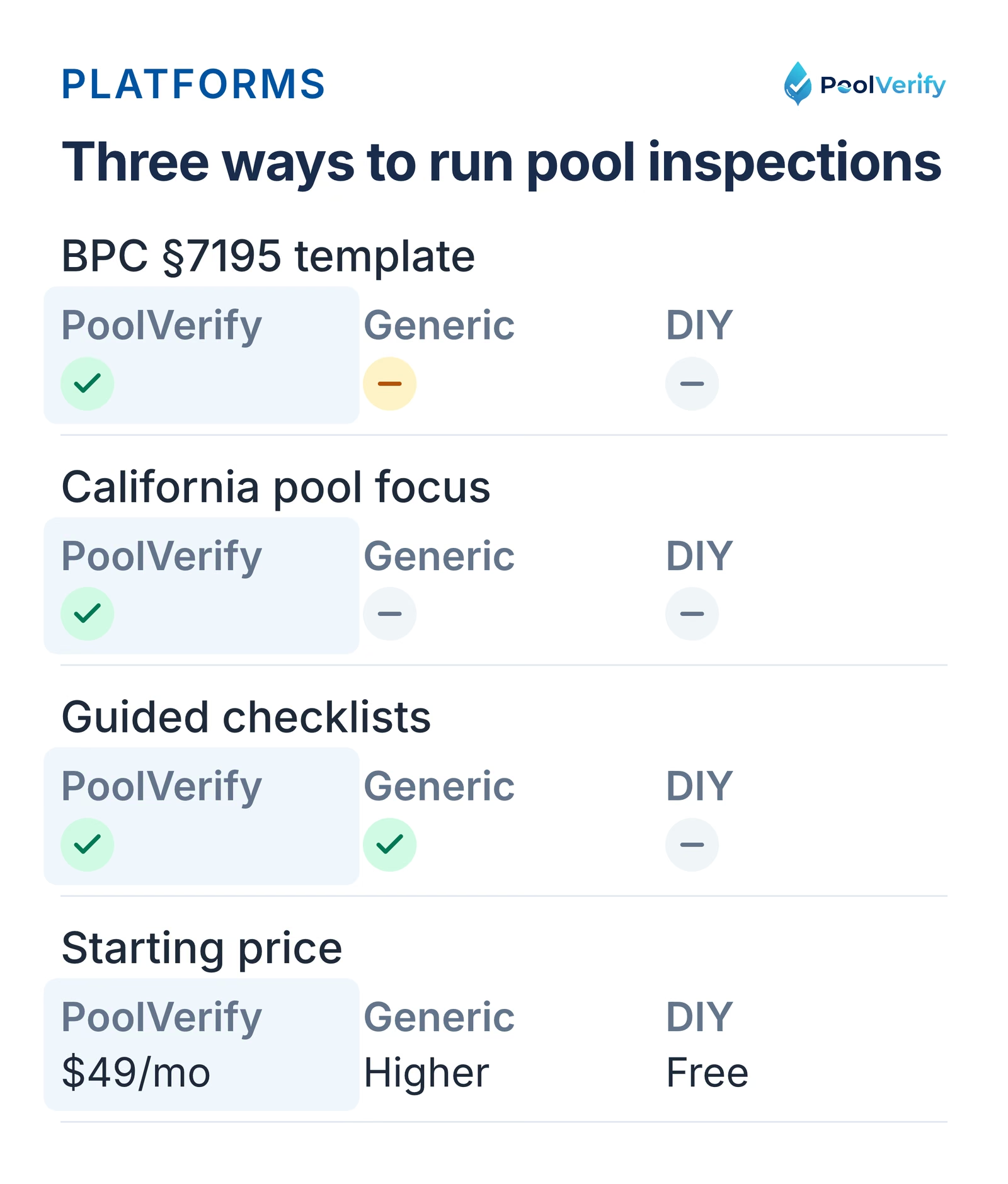
PoolVerify: Built exclusively for California pool safety inspections. Pre-built BPC §7195 and HSC §115922 checklists, responsive web app (no downloads), instant PDF reports, digital signatures, and cloud storage. Plans start at $49/month.
General home inspection platforms (Spectora, HomeGauge, ISN), Broader home inspection focus with pool add-on templates. More features for general home inspectors but less California pool-specific compliance support. Higher price points for comparable functionality.
DIY solutions (Google Forms, Word templates), Free but require significant manual work for reports, photos, and compliance documentation. No automation, no guided checklists, and limited professional presentation.
PoolVerify, general home inspection platforms, and DIY forms compared on California templates, checklists, and price.
Key features to look for
When evaluating platforms, prioritize these features in order of impact:
Must-have features
1. California compliance checklists: The platform must include BPC §7195 inspection templates with every required safety check. Building your own checklist from scratch defeats the purpose of buying software.
2. Integrated photo capture: Photos should be captured within the checklist workflow, automatically attached to the relevant inspection item. Separate photo apps create organizational chaos.
3. Instant report generation: One-tap PDF report creation with all findings, photos, and compliance references included. If you still need to manually compile reports after the inspection, the software isn't doing its job.
4. Digital signatures: Clients and inspectors should be able to sign reports on any device. Paper signature requirements add friction and delay.
5. Cloud storage and backup: Every inspection should be automatically saved and backed up. Losing inspection data to a device failure is a liability catastrophe.
Nice-to-have features
Scheduling tools: Built-in calendar and appointment management
Custom fields: Ability to add custom checklist items beyond the standard template
Team management: If you have or plan to hire additional inspectors
Analytics: Inspection volume tracking, completion time metrics, and business dashboards
Client portal: Where clients can view reports and sign documents online
Setting up your account
Once you've chosen a platform, setup typically takes 10-15 minutes. Here's what to expect:
Step 1: Create your account
Enter your email and create a password
Verify your email address
Select your plan or start a free trial
Step 2: Configure your profile
Business name: This appears on your inspection reports
License number: Your CSLB license or home inspector registration number
Contact information: Phone, email, and business address for report headers
Company logo: Upload your logo for branded report headers (PNG or JPG, at least 300px wide)
Step 3: Set your default inspection template
If the platform offers multiple templates, set BPC §7195 as your default for California pool safety inspections. This ensures every new inspection starts with the correct compliance checklist.
Step 4: Configure report settings
Report header/footer: Customize with your business information and any legal disclaimers
Email template: Set a default email message for delivering reports to clients
PDF format: Choose your preferred layout (most platforms offer 2-3 report styles)
Step 5: Test your setup
Create a test inspection, fill in a few items, capture a photo, and generate a report. Review the output to make sure your business information, logo, and formatting look correct before your first client inspection.
Your first practice inspection
Don't skip this step. A practice inspection on a non-client pool removes the pressure of performing while learning simultaneously.
Where to practice
Your own pool (if you have one)
A friend or family member's pool (with permission)
Your office or home (even a mock walkthrough helps)
An empty/vacant property you have access to
What to focus on during practice
Navigation flow: How do you move between checklist sections? Is it intuitive?
Photo capture: How quickly can you snap a photo and move to the next item? Does the photo attach to the right checklist item?
Data entry: How easy is it to enter measurements, notes, and pass/fail status?
Finding the right items: Can you quickly locate specific checklist items if you need to go back?
Report generation: How does the final PDF look? Is everything included that should be?
Expected timeline
First practice: 45-60 minutes (lots of exploring, learning the interface)
Second practice: 30-40 minutes (more confident with navigation)
Third practice: 25-30 minutes (approaching real-world speed)
By the third practice, you should feel comfortable enough to use the software on a real client inspection.
Your first real client inspection
You've practiced, you're familiar with the interface, and you have a real inspection scheduled. Here's how to make it smooth.
Before the inspection
Charge your device: Full battery. Bring a portable charger as backup
Pre-create the inspection: Enter the property address and client name before arriving
Review the checklist: Quickly scan through the sections so you know the flow
Allow extra time: Add 10-15 minutes to your normal inspection time for this first one
During the inspection
Follow the checklist order: Don't jump around. The checklist is designed to guide you through a logical sequence
Capture photos as you go: Take photos at each checklist item, not after. This links photos to findings and prevents missed documentation
Enter notes in real-time: Short notes while you're looking at the item are more accurate than detailed notes from memory later
Don't stress about speed: Your first digital inspection will be slower than your paper process. By the third inspection, you'll be faster. By the fifth, you'll wonder how you ever used paper
After the inspection
Generate the report on-site: If possible, generate and review the PDF before leaving the property. This catches any missing items while you're still there
Deliver immediately: Send the report to the client before you drive to your next inspection. Instant delivery is one of the biggest client-experience advantages of digital tools
Note what was slow: Make a mental or written note of any workflow steps that felt clunky. You'll optimize these over the next few inspections
Generating and delivering reports
Report generation is where digital inspection software delivers its biggest ROI. What used to take 30-60 minutes of post-inspection work now happens in seconds.
What a professional digital report includes
A well-generated report should contain:
Property information: Address, date, inspector details, client information
Compliance checklist results: Every BPC §7195 item with pass/fail status
Photo documentation: All captured photos organized by checklist section
Violation details: Each non-compliant item with the specific code reference and finding description
HSC §115922 safety feature summary: Which features are present and the total count
Inspector and client signatures: Digital e-signatures with timestamps
Professional formatting: Your company logo, branding, and contact information
Delivery options
Most platforms offer multiple delivery methods:
Email from the platform: Send directly to the client with a professional email template
PDF download: Download the PDF to your device and send via your own email
Client portal link: Some platforms generate a secure link where clients can view and download the report online
Client reaction
Expect positive feedback from your first digital report. Clients and real estate agents are accustomed to receiving quick, professional documentation. A branded PDF with organized photos and code references delivered the same day as the inspection sets you apart from inspectors still mailing or hand-delivering paper reports.
Ready to complete your first digital pool inspection? PoolVerify provides guided BPC §7195 checklists, instant PDF reports, and digital signatures, all in your browser. Start Your 14-Day Free Trial
Common beginner mistakes to avoid
These are the pitfalls that trip up most inspectors during their transition to digital:
Mistake 1: Going digital on a high-stakes inspection first
Don't make your first digital inspection a time-sensitive property transfer where the agent is watching. Practice first, then start with a low-pressure inspection where an extra 10 minutes won't matter.
Mistake 2: Not charging your device
Running out of battery mid-inspection forces you to finish on paper and defeats the purpose. Start every inspection day with a full charge and carry a portable battery pack.
Mistake 3: Trying to customize everything before starting
Some inspectors spend hours customizing templates, adding fields, and tweaking report formats before completing a single inspection. Start with the default templates. You can customize after you understand the workflow.
Mistake 4: Taking too few photos
Paper-trained inspectors often take 5-10 photos per inspection. Digital workflows make photos fast and free, take 20-30. More photos create better reports, stronger documentation, and fewer client disputes.
Mistake 5: Falling back to paper "just in case"
Running parallel paper and digital workflows doubles your work. Commit to digital for at least 5 consecutive inspections before evaluating. The first two will feel slow, that's normal. By the fifth, the speed advantage becomes clear.
Mistake 6: Ignoring offline mode
Test your software's offline capability before you need it. If you're inspecting at a property with poor cell coverage and you've never used offline mode, you'll scramble. Practice one offline inspection during your training period.
When to upgrade your plan
Most platforms offer tiered pricing. Here's when to move up:
Upgrade from Starter to Professional when:
You regularly exceed your monthly inspection limit
You need custom checklist fields for specialized inspections
You want scheduling and calendar features
You need viewer roles for assistants or office staff
Upgrade from Professional to Business when:
You hire additional inspectors who need their own accounts
You need team management features (assign inspections, review reports)
Your storage needs exceed the Professional tier limit
You want priority customer support
ROI check
At any tier, the software should pay for itself. If you're on the $49/month Starter plan and completing 15+ inspections per month, the software cost is roughly $3 per inspection: less than the paper, ink, and time cost of manual reports.
Limitations
This guide is general information about pool safety law, not legal advice; the current text of HSC §115922 and BPC §7195 on leginfo.legislature.ca.gov controls, and local building departments add their own requirements. PoolVerify is inspection software for California residential pool safety inspections; it does not perform inspections, certify inspectors, or issue compliance certificates.
Frequently asked questions
What is the best pool inspection software for beginners?
The best beginner pool inspection software has pre-built compliance checklists, guided workflows, and minimal setup.PoolVerify is designed specifically for California pool safety inspections with BPC §7195 templates that guide you through every required check. It works on any device without app downloads, generates professional PDF reports instantly, and most inspectors complete their first inspection within 30 minutes of creating an account.
How long does it take to learn pool inspection software?
Most inspectors complete their first digital inspection within 30-60 minutes of account creation. Basic proficiency, comfortable with checklists, photos, and report generation, develops within 3-5 inspections. Full fluency with advanced features like custom fields and team management typically takes 2-3 weeks of regular use. The learning curve is front-loaded; by inspection five, most users find digital faster than their previous paper process.
Do I need to download an app to use pool inspection software?
Not with web-based platforms.PoolVerify works directly in your device's browser (Safari, Chrome, Edge) without any app downloads. Just navigate to the website, log in, and start inspecting. This means instant access on any tablet, smartphone, or laptop without app store hassles. Some competitors require native app installations, which adds setup time and limits device flexibility.
Can I use pool inspection software offline?
Yes, most professional platforms support offline functionality. PoolVerify allows you to complete inspections, capture photos, and enter findings without an internet connection. When you reconnect to WiFi or cellular data, everything syncs automatically to the cloud. This is essential for pool inspections at properties with poor cell coverage or in rural areas of California.
How much does pool inspection software cost?
Pool inspection software typically costs $39-$199 per month. PoolVerify's plans: Starter ($49/month, $39/month annual) for up to 25 inspections with PDF reports and digital signatures; Professional ($99/month, $79/month annual) for unlimited inspections with custom checklists and scheduling; Business ($199/month, $159/month annual) for teams with unlimited members and priority support. All plans include a 14-day free trial. Annual billing saves 20%.
Start your digital inspection journey
The transition from paper to digital pool inspection software is one of the highest-impact changes you can make for your business. The time savings alone justify the investment within the first month, and the improvement in report quality, client experience, and documentation defensibility compound over time.
Start with a practice inspection, commit to the digital workflow for five consecutive client inspections, and evaluate the results. The inspectors who make this transition consistently report they'd never go back to paper.
PoolVerify is built specifically for California pool safety inspections, pre-loaded BPC §7195 checklists, instant PDF reports, digital signatures, and no app downloads. Start your 14-day free trial and complete your first inspection in under 30 minutes.
Last updated: September 9, 2026
What the client receives
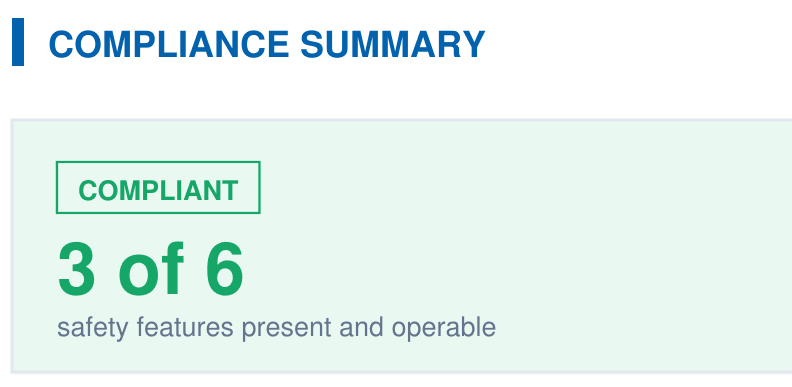
A branded PDF with the compliance summary, the feature table, each finding with its photos, and the signature, generated on‑site when the BPC §7195 and HSC §115922 checklist is complete.