Tracking Pool Compliance: Digital Tools vs Spreadsheets
Compare 3 pool compliance tracking methods: digital software, spreadsheets, and paper. See which saves time, reduces errors, and meets BPC §7195 requirements.
You can track pool compliance effectively using three methods, dedicated digital software, spreadsheets, or paper binders, but digital compliance platforms like PoolVerify reduce tracking errors by up to 95% and cut compliance documentation time in half compared to spreadsheets or paper systems. For California inspectors managing BPC §7195 and HSC §115922 requirements across dozens or hundreds of properties, the tracking method you choose directly impacts your accuracy, liability exposure, and daily productivity.
Tracking pool compliance means maintaining organized, retrievable records that prove every required safety feature has been inspected and documented according to California law. With approximately 1.34 million residential swimming pools in the state (California Energy Commission), the volume of compliance records California inspectors generate is enormous, and growing.
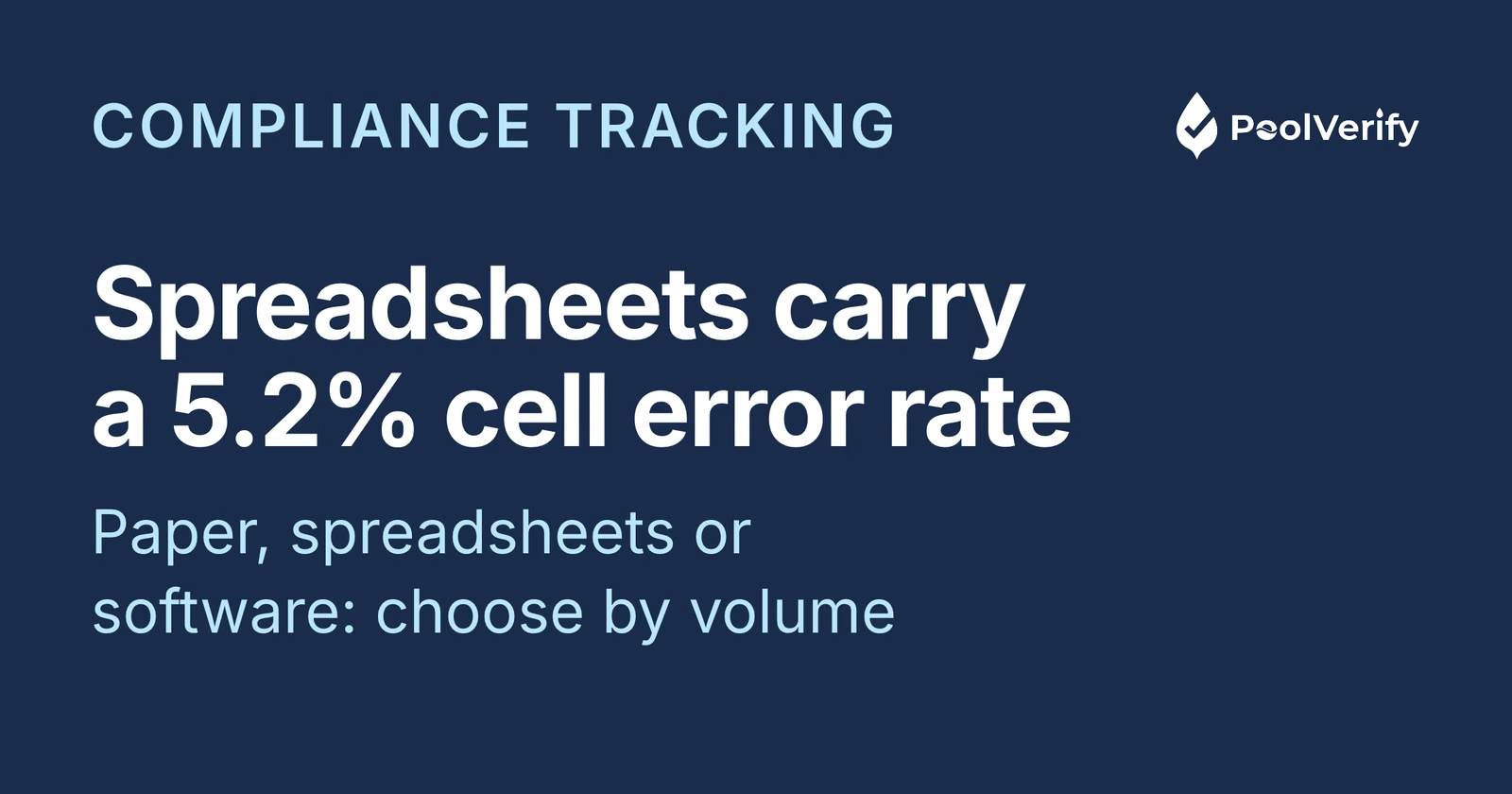
According to compliance industry research, 40% of compliance teams still rely on spreadsheets for tracking, while only 38% have adopted dedicated regulatory technology (Secureframe, 2026). That means most pool inspectors are using suboptimal tracking methods that increase error rates and liability risk. Research on spreadsheet accuracy shows that 88% of spreadsheets contain errors, with average cell error rates of 5.2% across operational spreadsheets (Dartmouth Tuck School of Business).
This guide compares all three tracking methods head-to-head, with specific attention to California BPC §7195 and HSC §115922 compliance requirements, so you can choose the right approach for your inspection volume and business needs.
Three methods for tracking pool compliance
California pool inspectors use three primary methods to track BPC §7195 and HSC §115922 compliance: paper-based systems, spreadsheet tracking, and dedicated digital compliance software. Each has a specific profile of cost, accuracy, and scalability.
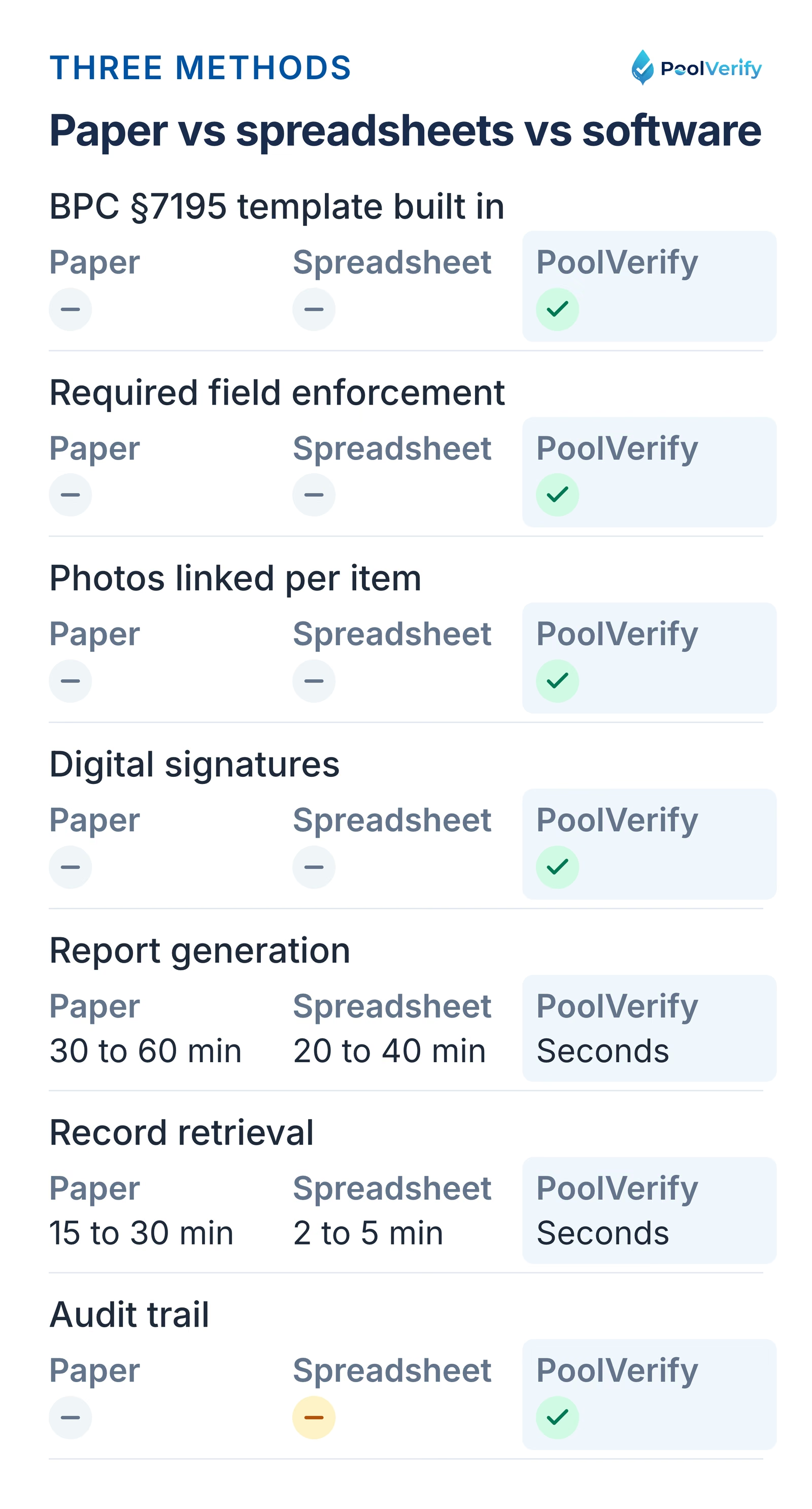
Paper, spreadsheets and PoolVerify compared on templates, required fields, photos, signatures, reports and audit trail.
Here's the fundamental tradeoff:
Paper is cheapest to start but most expensive to maintain and most error-prone
Spreadsheets offer better organization than paper but introduce formula errors and version control problems
Digital software has a monthly cost but eliminates most tracking errors and scales without additional labor
The right choice depends on your inspection volume, team size, and how much risk you're willing to accept from tracking errors. For California inspectors, the stakes of inaccurate compliance tracking are especially high, an average of 357 children under age 15 fatally drown in pool- or spa-related incidents each year (Consumer Product Safety Commission, 2025).
Method 1: Paper binders and filing cabinets
Paper-based compliance tracking uses printed inspection forms, physical photo prints, and filing cabinets to store pool safety records. It's the oldest method and requires zero technology investment, but it creates significant liability gaps.
How paper tracking works
A typical paper-based workflow for BPC §7195 compliance tracking:
Print blank inspection forms: Either custom forms or generic pool inspection templates
Complete forms by hand at each property, Write observations, check boxes, note deficiencies
Take photos separately: Use a phone or camera, then print or store photos in a separate folder
File completed forms: Organize by property address, date, or client name in filing cabinets
Retrieve manually: Search through cabinets when a record is needed for audits, legal inquiries, or re-inspections
Why paper tracking fails for California compliance
Paper tracking creates four critical compliance risks:
Incomplete documentation: No enforcement mechanism prevents inspectors from skipping checklist items. Research shows that manual data entry has a 1 to 5% error rate per field (ScienceDirect, 2011), and with 20+ required BPC §7195 safety items per inspection, the cumulative error risk is substantial.
Lost or damaged records: Fire, water damage, and simple misplacement destroy paper records permanently. There's no backup.
Photo disconnection: Photos stored separately from inspection forms lose their evidentiary link. A photo of a pool barrier means nothing if it can't be connected to a specific inspection record.
Retrieval delays: Finding a specific inspection from two years ago in a filing cabinet takes 15 to 30 minutes or more. Professionals spend up to 50% of their time searching for information in disorganized filing systems (Cflow, 2025).
Best for: Solo inspectors doing fewer than 5 inspections per month with no team members and minimal record retrieval needs.
Method 2: Spreadsheets (Excel or Google Sheets)
Spreadsheet-based compliance tracking uses Excel or Google Sheets to log inspection results, track property compliance status, and manage follow-up schedules: a significant step up from paper but still prone to critical errors at scale.
What a typical compliance spreadsheet looks like
Most pool inspectors who use spreadsheets create a master tracking sheet with columns like:
Property Address
Inspection Date
Inspector
BPC §7195 Status
Barrier
Gate
Alarm
Cover
Suction
Photos
Report Sent
Follow-up
123 Main St, LA
2026-03-01
J. Smith
Pass
Yes
Yes
N/A
Yes
Yes
Camera roll
Yes
N/A
456 Oak Ave, SD
2026-03-02
J. Smith
Fail
Yes
No
Yes
N/A
Yes
Camera roll
Yes
2026-03-15
This approach works for basic tracking. You can sort, filter, and search across properties. But the problems emerge quickly.
Where spreadsheets break down
According to research from Dartmouth's Tuck School of Business, 94% of operational spreadsheets contain errors, with an average cell error rate of 5.2%. For pool compliance tracking, common spreadsheet failures include:
Version control chaos: Multiple employees updating the same spreadsheet creates conflicting versions. It becomes unclear which file is the authoritative record (Secureframe, 2026).
No photo integration: Spreadsheets can't store photos. Inspectors must maintain a separate photo filing system and manually link images to inspection rows, the same disconnection problem as paper.
Formula and data entry errors: A mistyped date, an accidentally deleted row, or a broken formula can corrupt compliance records silently. Human error rates for manual data entry are 1 to 5% per entry (Fluxygen, 2025).
No required field enforcement: Nothing prevents an inspector from leaving a BPC §7195 safety item blank. An empty cell in a compliance spreadsheet is an undocumented safety feature.
No digital signatures: Spreadsheets don't support ESIGN Act-compliant signatures. Inspectors need a separate signing process.
No audit trail: Spreadsheets don't consistently capture who made changes, what was modified, and why, critical for regulated inspections (StaffReady, 2026).
When spreadsheets still work
Spreadsheets are adequate for tracking business metrics around inspections: like revenue per month, inspection counts, or scheduling. They're not adequate for tracking compliance documentation itself, where accuracy, completeness, and legal defensibility are required.
Outgrown your compliance spreadsheet? PoolVerify replaces manual tracking with pre-loaded BPC §7195 templates, automatic photo linking, and instant compliance reports. Start Your Free Trial
Method 3: Dedicated digital compliance software
Dedicated digital compliance software like PoolVerify combines the inspection checklist, photo documentation, digital signatures, compliance tracking, and report generation into a single platform: eliminating the disconnected workflows that cause tracking errors in paper and spreadsheet systems.
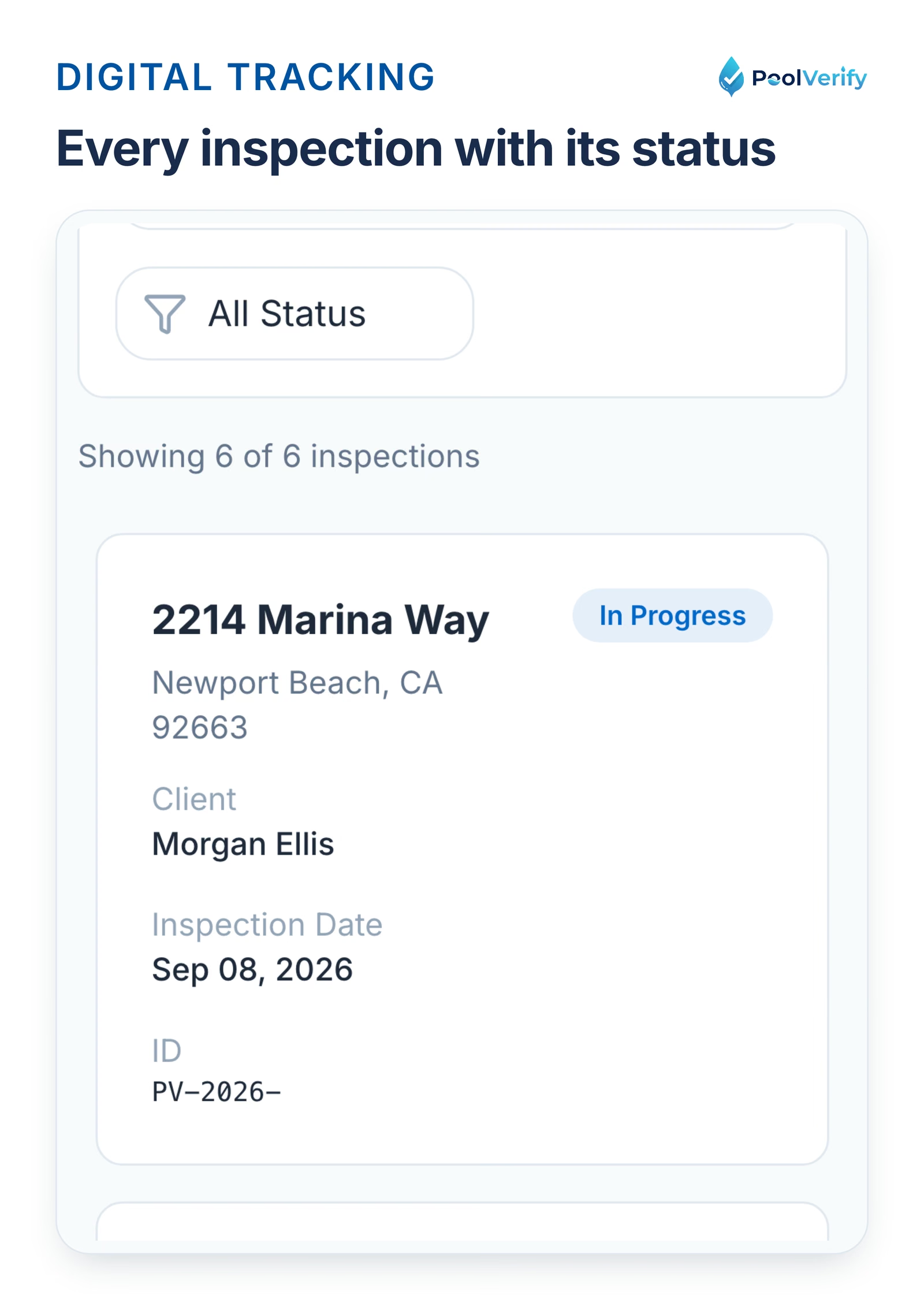
The PoolVerify inspections list with a status chip on each property record.
How digital compliance tracking works
With PoolVerify's digital compliance workflow:
Start an inspection: Enter property details and select the BPC §7195 template with all 20+ required safety items pre-loaded
Complete the checklist on-site: Mark each item pass/fail/N/A, capture up to 10 photos per item with automatic timestamps and linking
Collect digital signatures: ESIGN Act-compliant signatures from both inspector and client, captured on device
Generate instant PDF report: Professional branded report compiles all checklist data, photos, and signatures in seconds
Automatic cloud storage: Every inspection record is stored with 256-bit encryption, searchable by address, date, inspector, or compliance status
Why digital software eliminates tracking errors
Digital compliance platforms solve every problem that paper and spreadsheets create:
Required field validation: PoolVerify's BPC §7195 template cannot be completed until all mandatory safety items are addressed. No more blank fields or skipped checkpoints.
Integrated photo documentation: Photos are captured within the checklist and automatically linked to specific safety items. No separate photo management needed.
Single source of truth: All team members access the same cloud-based records in real time. No version conflicts, no conflicting spreadsheets.
Complete audit trail: Every change is logged with timestamps, inspector identification, and modification history.
Automatic compliance status: The software calculates overall compliance status from individual checklist items. No manual formula tracking.
Instant retrieval: Search any inspection by property address, date, inspector name, or status in seconds.
What digital tracking costs
PoolVerify's pricing starts at $49/month for 25 inspections (Starter plan), $99/month for unlimited inspections (Professional plan), and $199/month for teams (Business plan). At the Professional plan level, inspectors handling 100+ inspections monthly pay less than $1 per inspection for complete digital compliance tracking.
Compare that to the hidden costs of spreadsheet tracking, the 15 to 30 minutes spent per inspection on manual data entry, photo organization, and report formatting, plus the unquantified cost of errors that can lead to compliance failures and liability claims.
Head-to-head comparison: all three methods
Here's how paper, spreadsheets, and digital software compare across every factor that matters for California pool compliance tracking:
Tracking Factor
Paper Binders
Spreadsheets
Digital Software (PoolVerify)
Setup cost
$0 (forms + filing cabinet)
$0 to $20/month (Google Sheets/Excel)
$49 to $199/month
BPC §7195 templates
Print or create manually
Build manually
Pre-loaded, all 20+ items
Required field enforcement
None
None
Built-in validation
Photo integration
Separate storage
Separate storage
Automatic linking per item
Digital signatures
Not available
Not available
ESIGN Act-compliant
Error rate
1 to 5% per field
5.2% average per spreadsheet
Near zero (validated fields)
Record retrieval time
15 to 30 minutes
2 to 5 minutes
Instant (seconds)
Backup/disaster recovery
None
Cloud (if Google Sheets)
256-bit encrypted cloud backup
Audit trail
None
Limited
Complete with timestamps
Report generation
Manual (30 to 60 min)
Manual (20 to 40 min)
Instant PDF (seconds)
Team collaboration
Physical handoff
Version conflicts
Real-time cloud access
Offline capability
Always works
Requires setup
Yes (syncs when reconnected)
Scalability
Degrades rapidly
Breaks at 100+ records
Unlimited
Cost per inspection (at 100/mo)
~$3 to 5 (paper, printing, time)
~$2 to 3 (time cost)
$0.99 (Professional plan)
The pattern is clear: paper is cheapest to start but most expensive per inspection at scale. Spreadsheets offer a middle ground that breaks down as volume increases. Digital software has a monthly cost that's offset by dramatically lower per-inspection time and near-zero error rates.
Which method is right for your inspection volume?
The best compliance tracking method depends on how many inspections you conduct monthly and whether you work solo or with a team. Here's a decision framework:
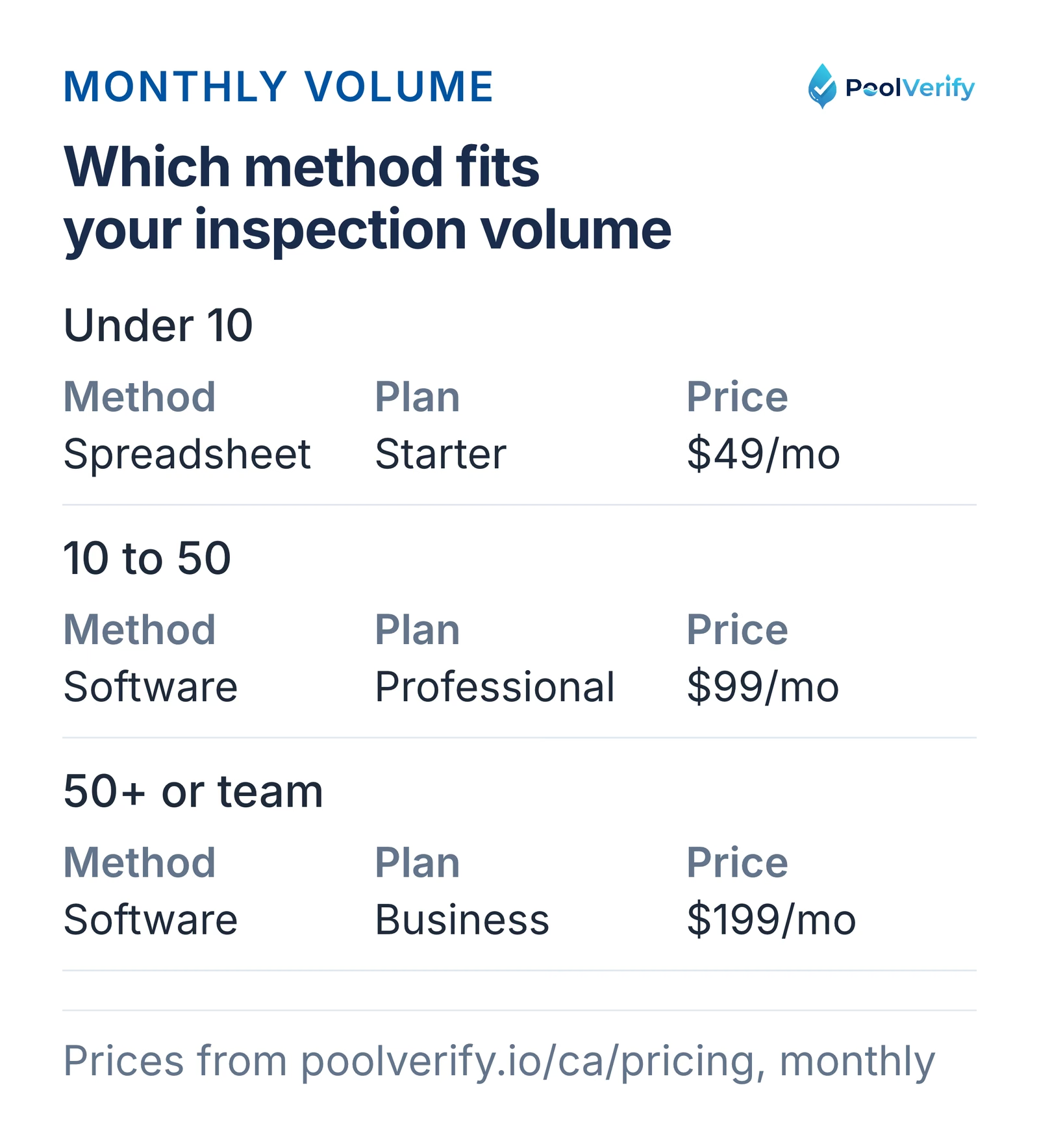
Under 10 a month a spreadsheet can work; 10 to 50 fits Professional at $99; 50 plus or teams, Business at $199.
Under 10 inspections per month (solo inspector)
A spreadsheet can work at this volume, if you're disciplined about data entry and maintain a separate organized photo system. Paper is viable but not recommended due to retrieval limitations.
However, even at low volume, the $49/month for PoolVerify's Starter plan (25 inspections included) pays for itself if it saves you 30 minutes per inspection on documentation, that's 5+ hours monthly you can spend on additional inspections.
10 to 50 inspections per month
Spreadsheets become unreliable at this volume. With 10 to 50 rows of compliance data added monthly, version control issues emerge, photo management becomes chaotic, and retrieval for re-inspections or client follow-ups consumes increasing time.
Digital compliance software is the clear choice. PoolVerify's Professional plan at $99/month provides unlimited inspections with complete tracking, photo documentation, and instant reporting.
50+ inspections per month (or team-based)
Paper and spreadsheets are not viable options at this scale. A team of inspectors sharing a spreadsheet will encounter conflicting versions, missing data, and inconsistent documentation quality that creates serious compliance risk.
PoolVerify's Business plan at $199/month supports multiple team members with role-based permissions, centralized compliance dashboards, and consistent documentation standards across all inspectors.
Organizations pursuing compliance tracking across multiple frameworks or with more than 50 controls find that purpose-built software provides essential capabilities, centralized evidence collection, automated monitoring, and continuous audit readiness, that spreadsheets cannot match (Secureframe, 2026).
How to switch from spreadsheets to digital tracking
Migrating from spreadsheet-based compliance tracking to digital software takes less than a day and can be done alongside your regular inspection schedule. Here's the process:
Step 1: Sign up for a free trial
Create your PoolVerify account with a 14-day free trial. No credit card is needed to start; you choose a plan when you download your first report, and nothing is charged until the trial ends. The trial gives you the full limits of the plan you choose, enough to test the full workflow.
Step 2: Complete your next inspection digitally
On your next scheduled inspection, use PoolVerify instead of your spreadsheet. Open the BPC §7195 template, complete the checklist at the property, capture photos within the app, and generate the PDF report.
Most inspectors complete their first digital inspection in 15 to 20 minutes and immediately notice the time savings from eliminated manual data entry.
Step 3: Run parallel for 1 to 2 weeks
If you want extra confidence, enter your next 3 to 5 inspections into both your spreadsheet and PoolVerify simultaneously. You'll quickly see the difference in speed and completeness.
Step 4: Retire the spreadsheet
Once you're comfortable with digital tracking, typically after 3 to 5 inspections, stop updating the spreadsheet. Your historical spreadsheet data remains as an archive, while all new compliance tracking happens in PoolVerify's searchable cloud system.
Your existing inspection records in spreadsheets don't need to be migrated, they're historical records. Going forward, all new inspections build your digital compliance history automatically.
Limitations
This guide is general information about pool safety law, not legal advice; the current text of HSC §115922 and BPC §7195 on leginfo.legislature.ca.gov controls, and local building departments add their own requirements. PoolVerify is inspection software for California residential pool safety inspections; it does not perform inspections, certify inspectors, or issue compliance certificates.
Frequently asked questions
Can I use Google Sheets to track pool compliance in California?
You can use Google Sheets for basic pool compliance tracking, but it has significant limitations for BPC §7195 documentation. Google Sheets can't integrate photos with checklist items, can't enforce required fields, doesn't support digital signatures, and doesn't generate professional PDF reports. For inspectors doing fewer than 10 inspections monthly, a well-maintained spreadsheet is functional, but PoolVerify's $49/month Starter plan eliminates the manual work and compliance gaps that spreadsheets create.
How much time does digital compliance tracking save per inspection?
Digital compliance tracking saves 30 to 45 minutes per inspection compared to spreadsheet-based workflows. The time savings come from eliminating manual data entry into the spreadsheet (10 to 15 min), photo organization (10 to 15 min), and report formatting (10 to 15 min). Organizations switching from paper to digital workflows report saving over 40 administrative hours per week on documentation processing (GoFormz, 2026). For inspectors handling 5+ inspections daily, that's 2.5 to 3.75 hours recovered every day.
What happens to my compliance records if my tracking software goes offline?
PoolVerify needs an internet connection. It saves each checklist answer and photo to the cloud as you work, and photos are compressed before upload so a weak cell signal is enough. Your records are then accessible from any device. PoolVerify stores all data with 256-bit encryption and automatic backups, so records are protected against data loss. This is a significant advantage over spreadsheets stored on local drives, which can be lost to hardware failure.
Are spreadsheet-based compliance records legally defensible?
Spreadsheet-based compliance records are weaker than digital records for legal defense because they lack audit trails, digital signatures, and tamper-resistant storage. If a compliance dispute arises, a spreadsheet can be edited without any record of the change, making it difficult to prove the record hasn't been altered. PoolVerify's timestamped, ESIGN Act-compliant records with complete audit trails provide significantly stronger legal protection.
Do I need separate tools for tracking and reporting?
No, the best pool compliance software handles both tracking and reporting in a single platform. PoolVerify combines compliance tracking (which properties have been inspected, their compliance status, and follow-up schedules) with inspection documentation (checklists, photos, signatures, PDF reports) in one system. Using separate tools for tracking and reporting introduces data gaps and doubles your administrative work.
Choose the tracking method that protects your business
Pool compliance tracking isn't just administrative work, it's the documentation that proves your inspections were thorough, your findings were accurate, and your clients' pools meet California safety standards. Every tracking error, every missing photo, and every incomplete checklist item is a gap in that protection.
For California pool inspectors, the choice between tracking methods comes down to a simple question: how much risk are you willing to accept? Paper systems have the highest error rates and no backup. Spreadsheets improve organization but introduce their own errors and can't integrate the photos, signatures, and reports that complete compliance requires. Digital software eliminates these gaps entirely.
PoolVerify is the only compliance tracking platform built exclusively for California pool safety, pre-loaded BPC §7195 templates, integrated photo documentation, instant PDF reports, and ESIGN Act-compliant digital signatures.
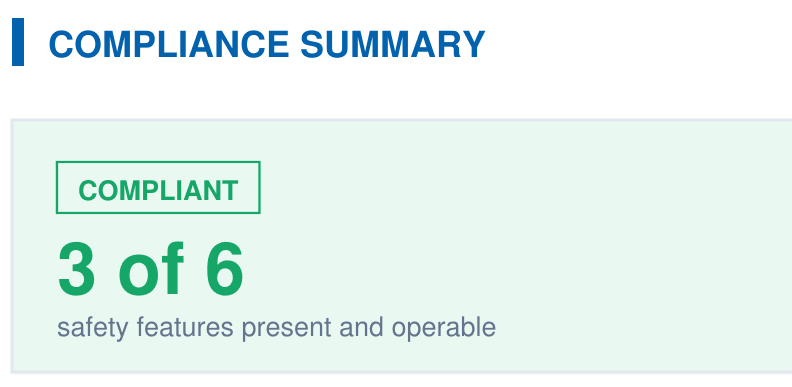
A branded PDF with the compliance summary, the feature table, each finding with its photos, and the signature, generated on‑site when the BPC §7195 and HSC §115922 checklist is complete.