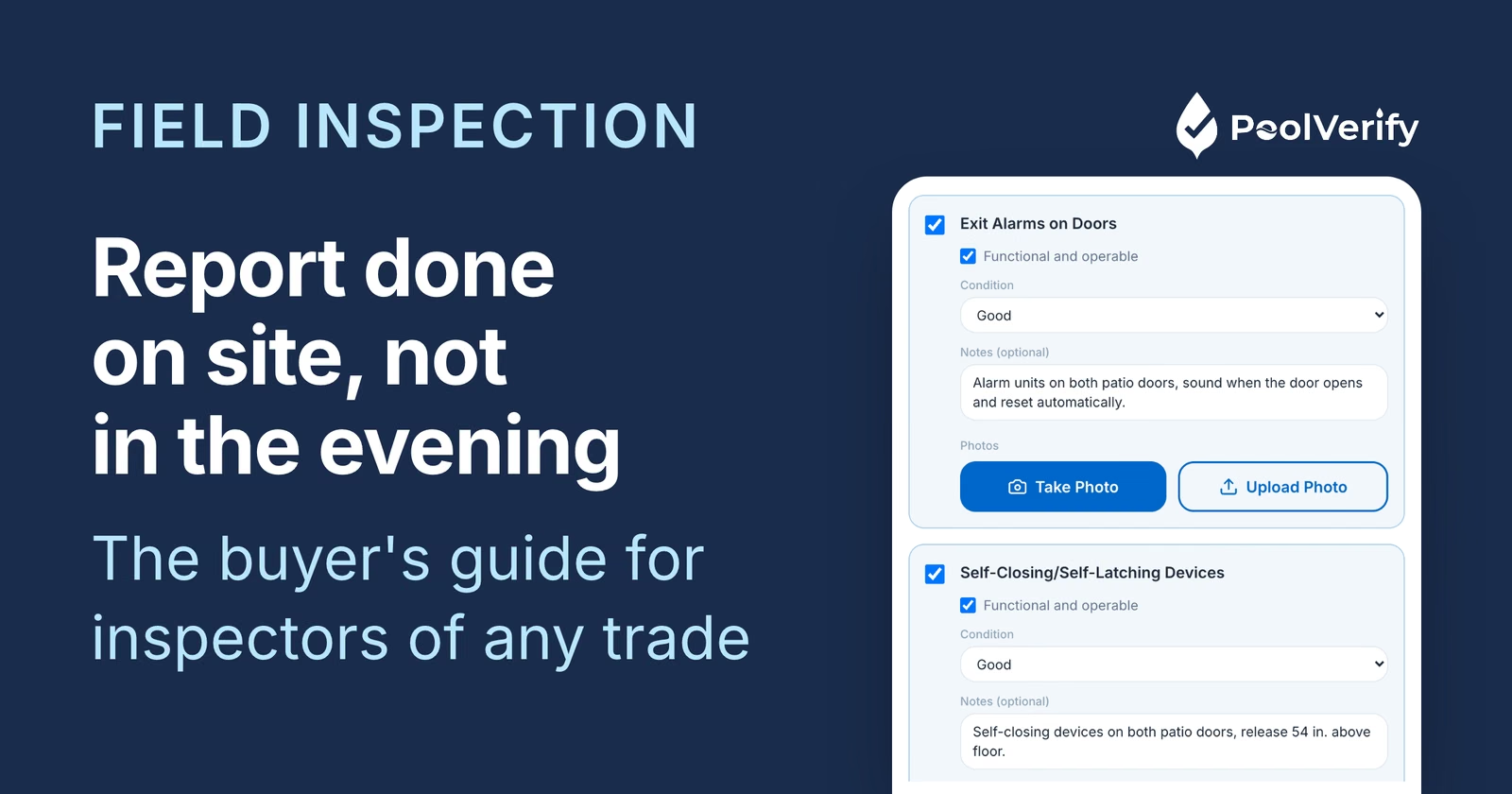
Comprehensive guide to field inspection software for pool inspectors, construction, and facility management. Compare mobile apps, features, pricing, and find the best solution for your inspection business.
Field inspection software has transformed how professionals conduct pool inspections, construction assessments, facility audits, and compliance checks. Modern mobile inspection apps replace clipboards and paper forms with digital checklists, instant photo documentation, and automated report generation, all accessible from smartphones and tablets. Whether you're a pool inspector documenting California safety compliance, a construction inspector verifying building codes, or a facility manager conducting routine assessments, choosing the right field inspection platform dramatically impacts efficiency, accuracy, and profitability.
This comprehensive buyer's guide explains what field inspection software is, which features matter most, how platforms compare, pricing expectations, and how to select the best solution for your specific inspection needs.
What is Field Inspection Software?
Field inspection software is a mobile or web-based application that enables inspectors to conduct, document, and report on inspections digitally while in the field. These platforms digitize the entire inspection workflow, from checklist completion to photo capture to final report generation, eliminating paper forms and manual transcription.
Traditional Paper Inspections vs Digital Field Software
Traditional paper-based workflow:
Print inspection checklist or forms
Travel to inspection site with clipboard
Handwrite notes and checkmarks on paper
Take photos with camera (separate from notes)
Return to office
Transcribe handwritten notes into computer
Download photos from camera
Insert photos into word processor
Format report manually
Generate PDF and email to client
File paper forms in cabinet
Time: 45-90 minutes total (15-30 min inspection + 30-60 min office work)
Digital field inspection workflow:
Open mobile app on smartphone/tablet
Travel to inspection site
Complete digital checklist on device
Capture photos directly in app (linked to checklist items)
Add notes and annotations on-screen
Tap "Generate Report" button
Review auto-formatted PDF with all photos
Email PDF to client instantly from device
Data automatically backed up to cloud
Time: 15-30 minutes total (completed entirely on-site)
Time savings: 30-60 minutes per inspection = 25-50 hours per month for busy inspectors
Core Components of Field Inspection Software
Modern field inspection platforms include these fundamental capabilities:
1. Mobile app (iOS/Android): Smartphone and tablet apps for field use 2. Digital checklists: Customizable inspection forms with checkboxes, dropdowns, text fields 3. Photo capture: In-app camera with annotation and labeling 4. Offline functionality: Works without internet, syncs when connected 5. Report generation: Automated PDF creation with branding 6. Cloud storage: Secure backup and access from anywhere 7. Dashboard: Web portal for managing inspections and viewing history
Key Features to Look For in Field Inspection Software
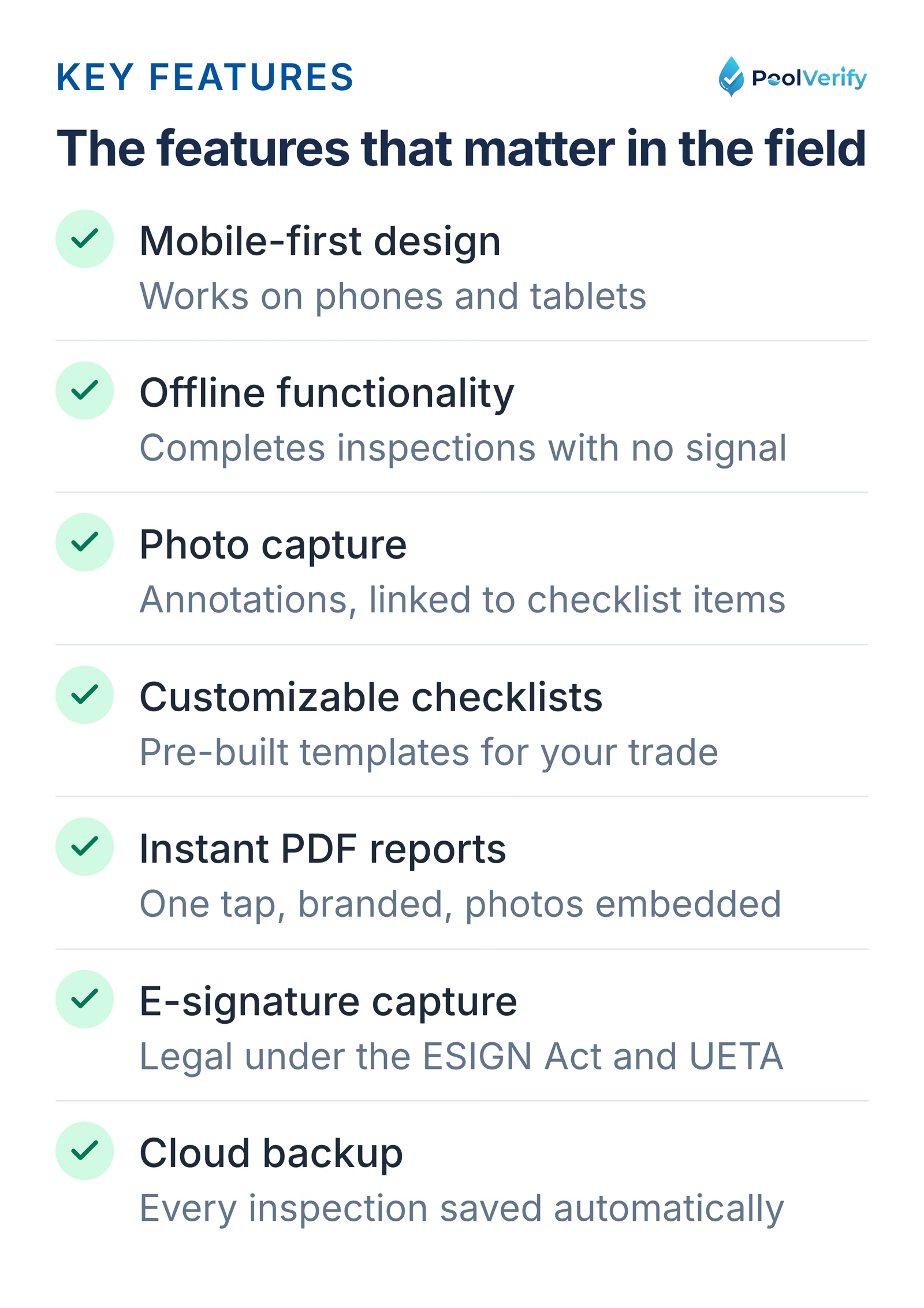
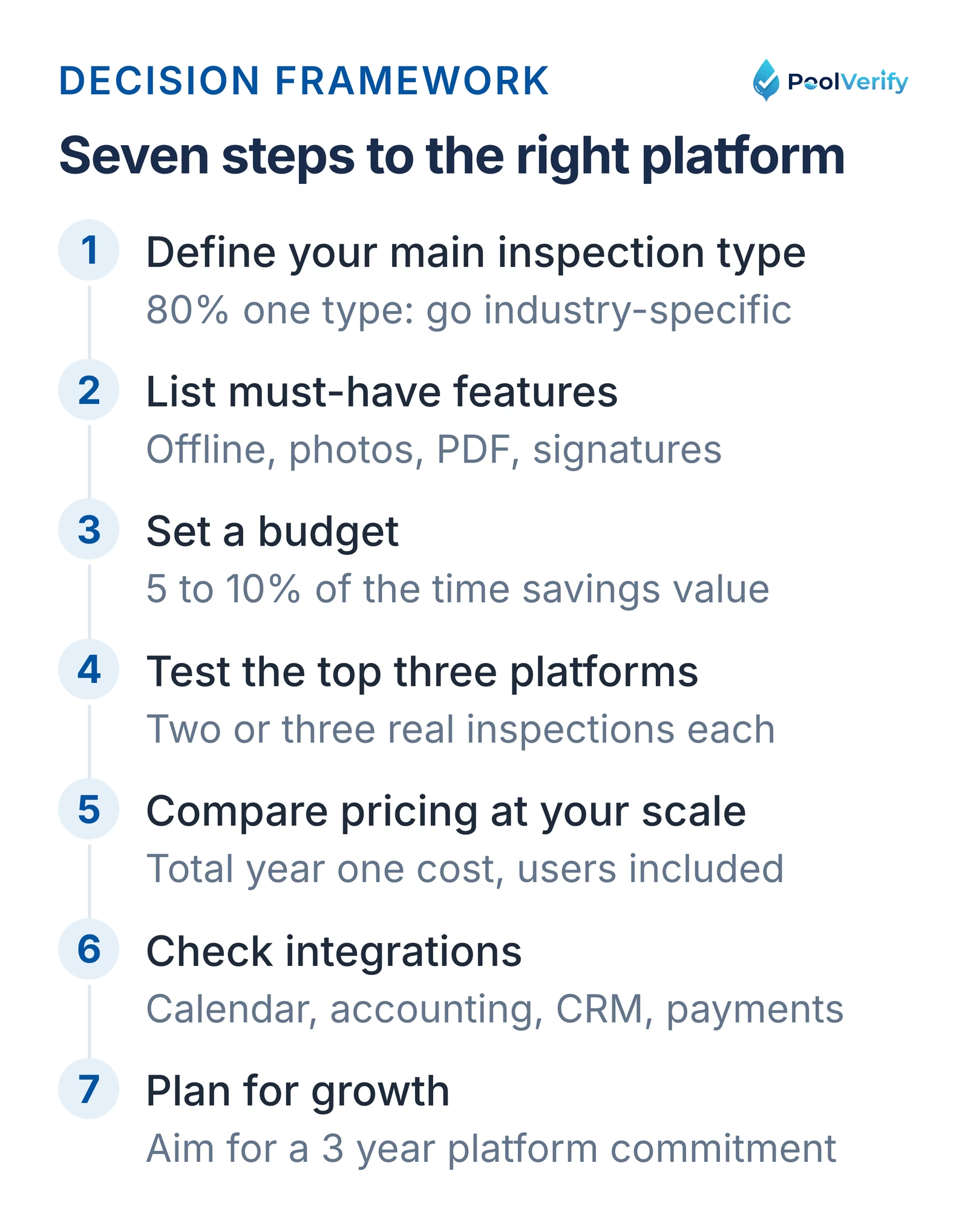
Seven features to look for in field inspection software
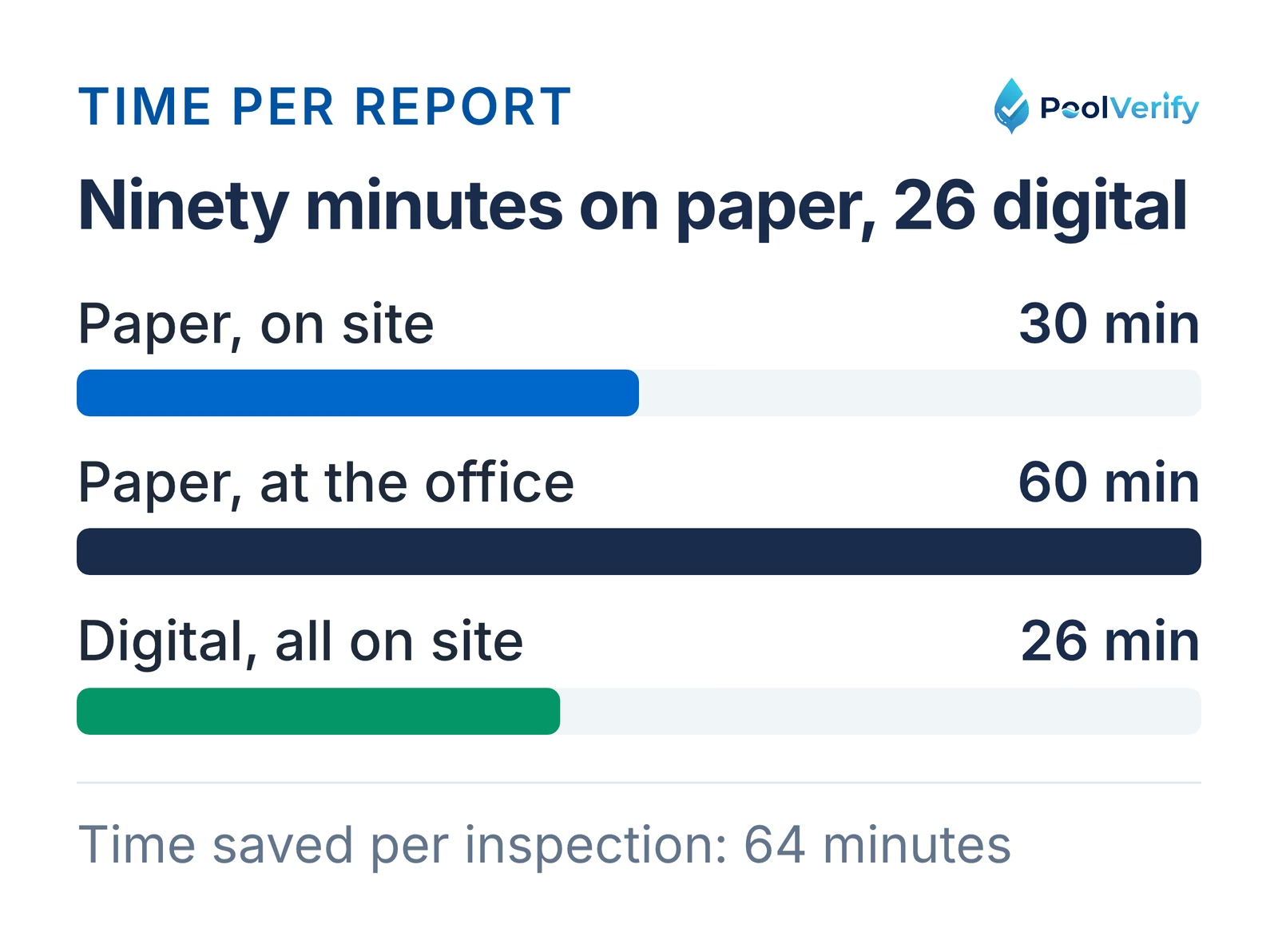
Time per inspection: 90 minutes on paper versus 26 minutes with a digital workflow
Not all field inspection platforms are created equal. Prioritize these features based on your specific inspection type and business needs.
1. Mobile-First Design (Critical for Field Work)
Your inspection software must work seamlessly on smartphones and tablets, not just desktop computers.
Why it matters: Field inspectors need to document findings at the inspection site, not transcribe notes later in an office. Desktop-only software forces double data entry.
What to look for:
Native iOS and Android apps (not just mobile-responsive websites)
Touch-optimized interface with large tap targets
Readable in direct sunlight (high-contrast display options)
Functions with gloves on (for winter/protective gear)
Supports both portrait and landscape orientations
Red flags:
"Desktop version recommended" messaging
Requires stylus or precise tapping
Tiny fonts difficult to read outdoors
Mobile app is "viewer only" (can't conduct inspections)
2. Offline Functionality (Essential for Reliable Field Use)
Offline capability allows inspectors to complete inspections without internet connectivity.
Why it matters: Many inspection sites have poor or no cellular/WiFi coverage:
Residential backyards (pool inspections)
Construction sites (pre-internet installation)
Underground facilities
Rural properties
Buildings with thick walls blocking signals
How it works: App stores inspection data locally on device during offline use, then automatically syncs to cloud when connectivity returns.
What to look for:
Full inspection functionality offline (not just viewing)
Photos captured offline save to device storage
Clear visual indicator showing online/offline status
Automatic background syncing when connected
No data loss if connection drops mid-inspection
Test during trial: Enable airplane mode and attempt to complete a full inspection. If any features are disabled or you receive error messages, offline support is inadequate.
3. Photo and Video Capture Capabilities
Visual documentation is often more important than written notes for inspections.
Essential photo features:
In-app camera: Capture photos without leaving inspection
Photo labeling: Name photos or link to specific checklist items
Photo organization: Automatic sorting by inspection area
Compression: Optimizes file sizes for faster upload/email
Advanced photo features (nice to have):
Before/after photo pairing
Thermal imaging support
360° photo capture
Voice-to-text captions
Photo timestamps and GPS tagging
Video support: Some platforms allow short video clips (10-60 seconds) to document moving parts, operational equipment, or complex issues difficult to show in still photos.
Storage considerations: Each inspection typically generates 20-50 photos at 2-5MB each (40-250MB per inspection). Verify the platform includes adequate cloud storage or offers affordable expansion.
4. Customizable Checklists and Templates
Your inspection software must accommodate your specific inspection types, workflows, and compliance requirements.
Form field types:
Checkboxes (pass/fail, yes/no)
Dropdowns (multiple choice selections)
Text fields (short notes)
Text areas (long descriptions)
Number inputs (measurements, quantities)
Date/time pickers
E-signature capture
Photo/video attachments
Template features:
Pre-built templates for your industry (pool, construction, facility, safety)
Conditional logic: Show/hide sections based on answers
Required fields: Prevent incomplete inspections
Section organization: Group related items
Multi-page support: Long inspections broken into manageable sections
Industry-specific consideration: Pool inspection software requires California BPC §7195 compliance templates with all seven drowning prevention safety features. General field inspection platforms require manual template creation, consuming 10-20 hours initially.
5. Instant Report Generation
The ability to generate professional PDF reports immediately after inspection completion is a critical differentiator.
Report features:
One-tap generation: Create PDF in seconds
Automatic formatting: Professional layout without manual work
Photo inclusion: All inspection photos embedded in report
Custom branding: Your company logo, colors, contact information
Pass/fail summaries: Visual indicators of overall compliance
Digital signatures: Client sign-off embedded in report
Email delivery: Send PDF directly from app
Speed matters: Best platforms generate comprehensive reports in 5-15 seconds. Slow platforms requiring 2-5 minutes create awkward delays while client waits.
On-site delivery advantage: Handing clients a professional printed or emailed report before leaving the inspection site dramatically improves perceived value and professionalism.
6. GPS Tagging and Timestamps
Automatic location and time capture provides legal defensibility and operational insights.
GPS tagging benefits:
Proof of attendance: Verifies inspector was physically at site
Disclosure acceptance: Client agrees to scope limitations
Work authorization: Approval to proceed with recommended repairs
Photo permissions: Consent to use property images
Payment confirmation: Receipt of payment acknowledgment
Legal validity: E-signatures captured via field inspection software are legally binding in the United States under the ESIGN Act (2000) and UETA (Uniform Electronic Transactions Act).
What to look for:
Touchscreen signature capture (finger or stylus)
Multiple signature fields per inspection
Signer name and date auto-populated
Signatures embedded in final PDF report
Tamper-evident (can't modify after signing)
8. Cloud Storage and Backup
Automatic cloud backup protects against device loss, damage, or failure.
Budget platforms: 1-5GB included, $5-10/month per 10GB additional
Mid-range platforms: 50-100GB included
Industry-specific platforms: Often unlimited or very high limits (500GB-1TB)
Enterprise platforms: Unlimited storage
Backup frequency: Best platforms backup continuously (every action saved immediately). Lesser platforms backup only when online or require manual sync.
Data retention: Verify how long inspection records are stored. Most platforms retain indefinitely as long as subscription is active. Confirm what happens to data if you cancel (export options, retention period).
9. Compliance and Regulatory Templates
If your inspections must meet specific regulatory requirements, compliance-focused features become critical.
California pool inspection example: State law (BPC §7195 and HSC §115922) requires specific inspections of seven drowning prevention safety features. California-compliant inspection software must include all seven features in the checklist, use correct legal terminology, and generate reports formatted for municipal submission.
Compliance features:
Pre-built regulatory checklists: Already include required items
Legal terminology: Uses exact code language
Reference citations: Includes statute/code section numbers
Health department inspections: Restaurant, pool, childcare facility
Building code inspections: Construction compliance verification
Environmental inspections: EPA, state environmental regulations
Fire safety inspections: NFPA code compliance
Generic vs industry-specific: General field inspection software requires manual creation of compliance checklists (10-20 hours + ongoing maintenance as regulations change). Industry-specific platforms include regulatory updates automatically.
10. Multi-User and Team Features
If you employ multiple inspectors or plan to grow, team management capabilities become important.
Multi-user features:
User accounts: Separate login for each inspector
Role-based permissions: Admins vs field inspectors
Assignment: Dispatch inspections to specific team members
Workload visibility: See who's conducting which inspections
Inspection history: Track which inspector performed each job
Reporting by inspector: Performance metrics per team member
Pricing for teams: Most platforms charge per user/month. Compare:
Flat-rate pricing: for example, PoolVerify Business at $159/month on annual billing with unlimited team members
Tiered pricing: Small team (1-5 users) $99/month, Medium team (6-15 users) $199/month
Team size consideration: If you have or plan to have 3+ inspectors, flat-rate or tiered pricing usually offers better value than per-seat models.
Field Inspection Software Categories
Three categories of field inspection software by setup time and price
Field inspection platforms fall into three main categories, each with distinct advantages and trade-offs.
Category 1: Industry-Specific Inspection Software
Designed exclusively for one industry or inspection type.
Examples:
PoolVerify: Pool and spa safety inspections
Spectora, HomeGauge: Home inspections (general, not pool-specific)
CompanyCam, Fieldwire: Construction inspections
FacilityBot: Facility management inspections
SafetySync: OSHA workplace safety inspections
Advantages: Yes Pre-built compliance checklists (ready to use immediately) Yes Industry-specific terminology and report formatting Yes Regulatory updates included automatically Yes Optimized workflow for specific inspection type Yes Often includes industry integrations (equipment databases, vendor networks)
Disadvantages: No Only works for one inspection type (can't use for other services you offer) No Less flexibility to customize for unique needs No Smaller user communities (fewer third-party resources)
Best for: Inspectors who conduct primarily or exclusively one type of inspection and need strong compliance support.
Example: Pool inspectors conducting 80%+ pool safety inspections should use pool-specific inspection software rather than general platforms. The compliance accuracy and time savings outweigh flexibility limitations.
Category 2: General Field Inspection Platforms
Customizable platforms suitable for any inspection type across multiple industries.
Examples:
SafetyCulture (iAuditor): Widely used across industries
GoCanvas: Customizable form builder approach
Fulcrum: GIS-focused inspection platform
GoAudits: Quality assurance and compliance focus
FormConnect: Highly customizable forms
Advantages: Yes Extreme flexibility, build any checklist you need Yes Can use for multiple different inspection types (pool, construction, facility, safety) Yes Large template libraries (community-contributed forms) Yes Usually more affordable for solo inspectors Yes Large user communities (training resources, forums, help)
Disadvantages: No Require significant setup time (10-40 hours building templates) No No regulatory compliance verification (you must know requirements) No Generic reports (not formatted for specific industries/authorities) No Ongoing maintenance as regulations change (manual updates) No Learning curve to build effective templates
Best for: Inspectors who conduct many different types of inspections, or businesses needing extreme customization.
Example: A property management company conducting pool inspections, playground inspections, fire safety checks, and facility assessments would benefit from a general platform they can customize for all inspection types.
Category 3: Enterprise Inspection Management Systems
Comprehensive platforms combining field inspections with business management, scheduling, billing, and analytics.
Examples:
ServiceTitan: Field service management (includes inspections)
Housecall Pro: Service business management
Jobber: Field service operations platform
mHelpDesk: Work order and inspection management
Advantages: Yes All-in-one solution (inspections, scheduling, invoicing, customer management) Yes Advanced analytics and business intelligence Yes Customer portal integration Yes Automated workflows (inspection to quote to work order to invoice) Yes Scalable for large teams (10-100+ field workers)
Disadvantages: No Expensive ($100-300+/user/month) No Complex implementation (weeks to months) No Overkill for inspection-only businesses No Long-term contracts (often annual commitments) No Inspection features less robust than dedicated platforms
Best for: Large field service businesses (20+ employees) needing integrated business management beyond just inspections.
Example: A pool service company with 15 technicians conducting weekly pool maintenance, equipment repairs, and compliance inspections would benefit from an enterprise platform integrating all operations.
Top Field Inspection Software Platforms Compared
For Pool Inspectors: PoolVerify
Best for: Residential pool and spa safety inspections in California
Key features:
Pre-built California BPC §7195 compliance checklists
HSC §115922(a) drowning prevention safety features included
Up to 10 photos per checklist item, compressed automatically
Instant PDF report generation with the compliance summary
Responsive web app (any device with a browser, no download)
Saves to the cloud as you go (internet connection required)
Timestamps on every photo
E-signature capture
Custom branding
Pricing: $39/month (Starter), $79/month (Professional), $159/month (Business), on annual billing
Free trial: 14 days
Advantages:
Specifically designed for pool compliance inspections
California BPC §7195 and HSC §115922 templates built in
Flat-rate plans (no per-user fees)
Limitations:
Pool/spa inspections only (can't use for other inspection types)
Not suitable for comprehensive home inspections (pools are one component)
Best-in-class location accuracy and GIS capabilities
Excellent for inspections requiring precise coordinates
Strong data export and integration options
Limitations:
More complex than necessary for simple inspections
Higher learning curve
Per-user pricing (3 users = $105-180/month)
Overkill for inspections not requiring GIS
Pricing Comparison: What to Expect
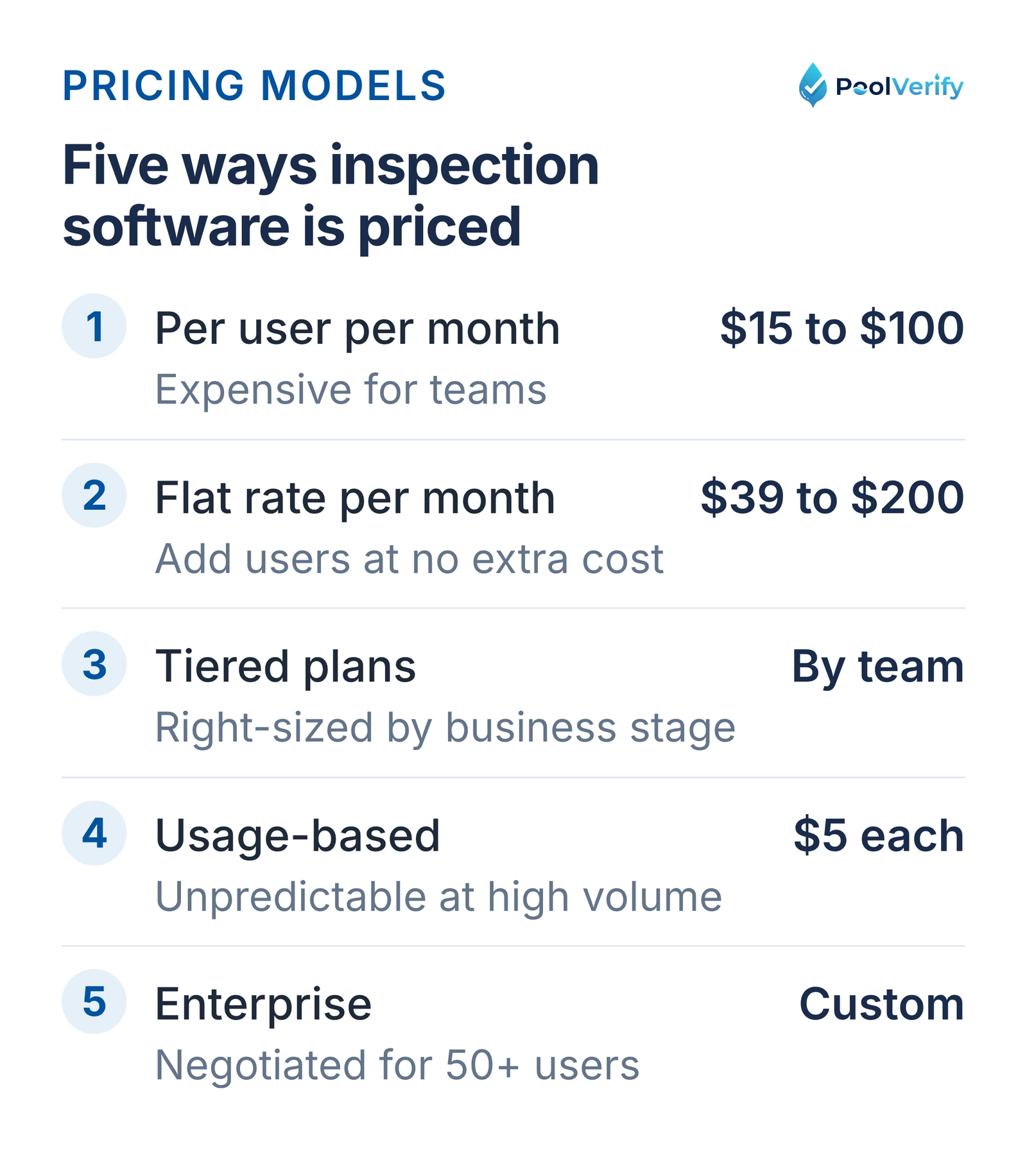
Five pricing models for inspection software, from per-user to enterprise
Field inspection software pricing varies significantly based on features, users, and industry focus.
Pricing Models
1. Per-User/Month (most common)
Range: $15-100/user/month
Example: 3 inspectors × $39/user = $117/month
Advantages: Predictable scaling, pay only for active users
Disadvantages: Expensive for teams, seasonal businesses pay year-round
2. Flat-Rate/Month (increasingly popular)
Range: $39-200/month flat rate
Example: $79/month regardless of 1, 3, or 10 users
Advantages: Cost-effective for teams, add users without price increases
Disadvantages: Solo inspectors may pay more than per-user alternatives
3. Tiered Plans (hybrid approach)
Example: Starter $39 (1 user), Team $99 (up to 5), Business $199 (unlimited)
Advantages: Right-sized pricing for different business stages
Disadvantages: Can be confusing, upgrade triggers if team grows
4. Usage-Based (rare for inspections)
Example: $5 per inspection conducted
Advantages: Pay only for actual use
Disadvantages: Unpredictable costs, expensive at high volumes
5. Enterprise/Custom (large organizations)
Example: Custom pricing for 50+ users
Advantages: Negotiable, tailored to specific needs
Disadvantages: Long sales process, requires commitment
Price Ranges by Category
Category
Price Range
Example Platforms
Free
$0/month
Google Forms, Jotform Free, Typeform Free
Budget
$15-30/user/month
SafetyCulture Free-Premium, basic GoCanvas
Mid-Range
$30-60/user/month
GoCanvas, Fulcrum, FormConnect
Industry-Specific
$39-79/month flat
PoolVerify, niche compliance platforms
Construction
$39-100/user/month
Fieldwire, Procore, PlanGrid
Enterprise
$100+/user/month
ServiceTitan, mHelpDesk, custom solutions
Hidden Costs to Consider
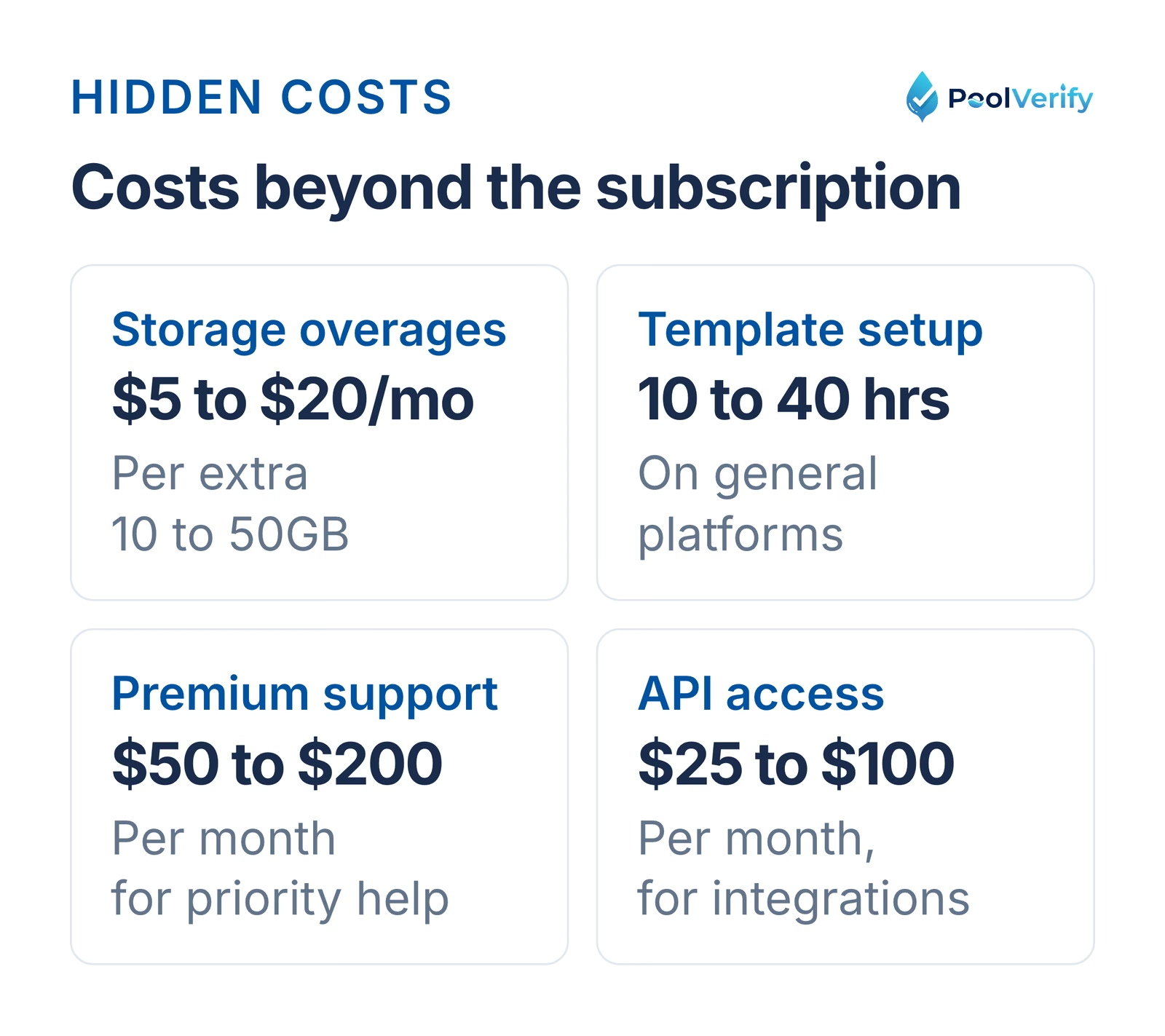
Costs beyond the subscription: storage, template setup, support tiers, and API access
Beyond monthly subscription fees, watch for these additional expenses:
Storage overages: $5-20/month per additional 10-50GB Advanced features: Report customization ($10-50/month), API access ($25-100/month) Integrations: Third-party connections may require premium plans Training: Platform onboarding, team training (1-10 hours × your hourly rate) Implementation: Template creation, customization (10-40 hours for general platforms) Support: Premium support tiers ($50-200/month for priority assistance)
Annual vs monthly billing: Most platforms offer 10-20% discounts for annual commitments. For a $39/month plan:
Professional budget: $60-100/month (premium features, industry-specific)
Team/company realistic budgets:
Small team (2-5 inspectors): $50-150/month
Medium team (6-15 inspectors): $150-400/month
Large team (16+ inspectors): $400-1,000+/month
ROI calculation: Calculate time saved per inspection:
Manual transcription time: 30-45 minutes
Digital inspection time: 0 minutes (generate report on-site)
Time saved: 30-45 min × hourly rate × inspections per month = monthly value
Example: 30 min saved × $60/hour = $30 per inspection × 50 inspections = $1,500/month value A $79/month platform saving $1,500/month in time = 1,800% ROI
Budget should be 5-10% of time savings value.
Step 4: Test Top 3 Platforms
Never purchase without testing. Most platforms offer 14-30 day free trials.
Testing checklist (conduct 2-3 real inspections on each platform):
Ease of use:
Downloaded and logged in within 5 minutes
Found template or created checklist within 15 minutes
Conducted full mock inspection on mobile device
Interface intuitive (minimal training needed)
Offline functionality:
Enabled airplane mode mid-inspection
Completed inspection items offline
Captured photos offline
Data synced automatically when back online
Report quality:
Generated report in under 30 seconds
Report looks professional (suitable to send clients)
Photos included and properly formatted
Branding (logo, colors) displays correctly
PDF file size reasonable (<5MB for email)
Mobile experience:
Readable in bright outdoor sunlight
Touch targets large enough for easy tapping
Photo capture works smoothly
Typing notes not frustrating on mobile keyboard
App didn't crash or freeze
Support responsiveness:
Submitted question via support channel
Received response within 24 hours
Answer was helpful and accurate
Rank platforms 1-3 based on overall testing experience.
Step 5: Compare Pricing at Your Scale
Calculate actual cost for your specific situation (1 year):
Platform A (per-user pricing):
$39/user/month × [number of users] × 12 months
+ $X/month storage overages × 12
+ $X one-time setup/training
= Total Year 1 Cost: $_____
Platform B (flat-rate pricing):
$79/month × 12 months
+ $X/month storage overages × 12
+ $X one-time setup/training
= Total Year 1 Cost: $_____
Platform C (free/budget option):
$0 or $19/user/month × [number of users] × 12
+ Cost of manual workarounds (template creation, etc.)
+ Opportunity cost of limited features
= Total Year 1 Cost: $_____
Lowest total cost wins (unless significant feature differences justify premium).
Step 6: Check Integration Requirements
If you use other business software, verify integration compatibility:
Common integrations:
Calendar/scheduling: Google Calendar, Outlook, Calendly
Accounting: QuickBooks, Xero, FreshBooks
CRM: Salesforce, HubSpot, Zoho
Communication: Slack, Microsoft Teams, email
Storage: Google Drive, Dropbox, OneDrive
Payments: Stripe, Square, PayPal
Integration methods:
Native integrations (built into platform), easiest, most reliable
Zapier connections (third-party automation), flexible but requires Zapier subscription
API access (custom development), most powerful but requires technical skills
If critical integrations are missing, platform may create workflow friction despite strong inspection features.
Step 7: Evaluate Long-Term Scalability
Consider where your business will be in 2-3 years:
Growth scenarios:
Solo inspector now to 2-3 inspectors in 2 years: Verify per-user pricing remains affordable, or choose flat-rate option
Pool-only now to Adding related services later: General platform may offer more flexibility
Small market now to Expanding territory: Check if platform supports multi-location/franchise features
Platform switching costs:
Migration time (exporting data, learning new platform): 10-40 hours
Lost historical data (if export not possible)
Template recreation (if proprietary formats)
Team retraining
Customer confusion (report format changes)
Aim for 3+ year platform commitment to justify switching costs and learning investment.
Implementation Best Practices
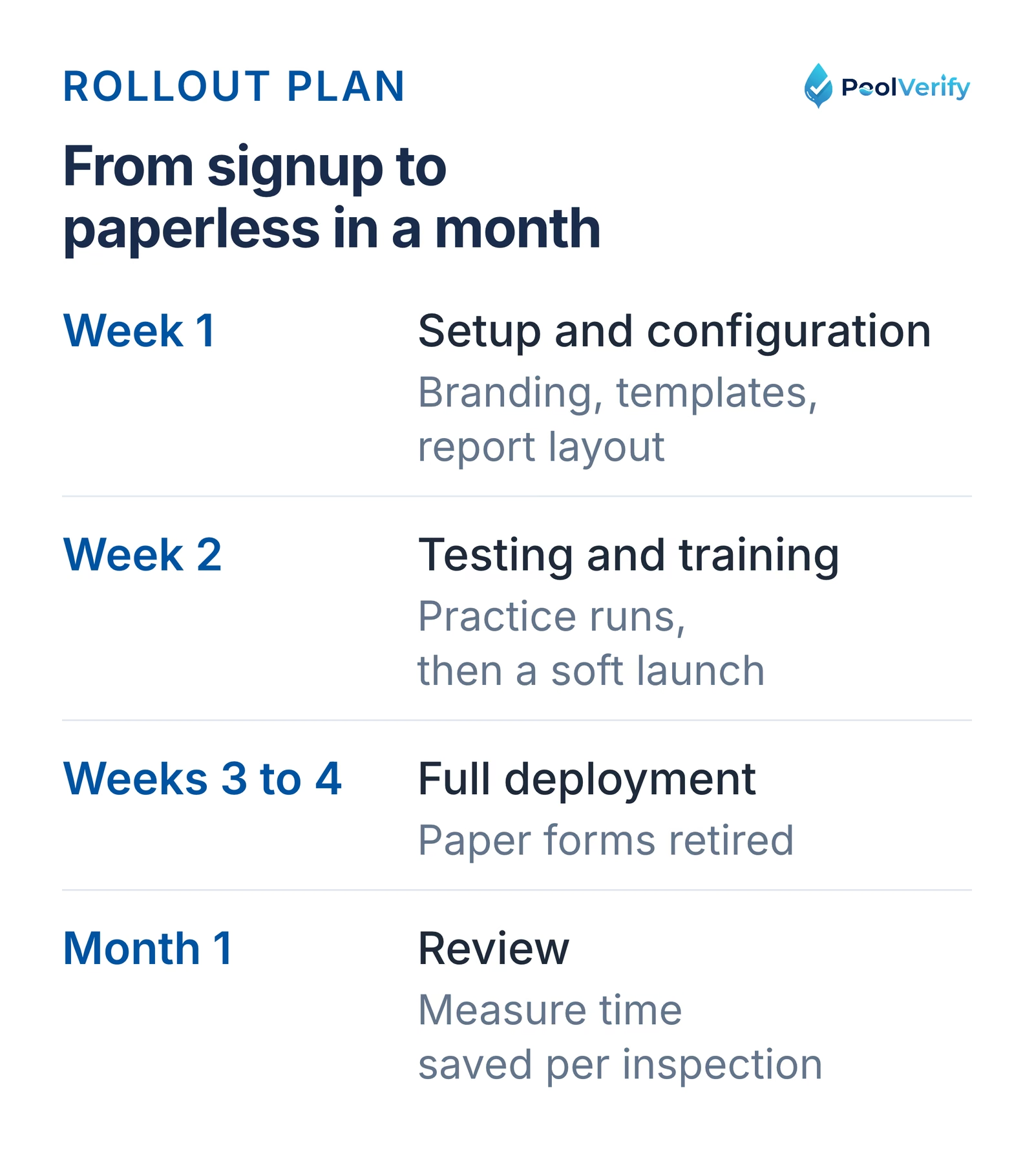
A four-week rollout from account setup to a fully paperless workflow
Once you've selected a field inspection platform, follow these steps for smooth implementation.
Week 1: Setup and Configuration
Day 1-2: Account setup
Create account and complete profile
Upload company logo and branding assets
Configure email signature and from address
Set up team member accounts (if applicable)
Install mobile apps on all devices
Day 3-4: Template creation/customization
Import or create primary inspection template
Customize checklist items for your workflow
Add required fields and conditional logic
Configure pass/fail criteria
Set up photo requirements per section
Day 5-7: Report customization
Design report cover page with branding
Configure report sections and ordering
Add standard disclaimers and disclosures
Set up email templates for report delivery
Generate sample reports and review formatting
Week 2: Testing and Training
Day 8-10: Internal testing
Conduct 3-5 practice inspections on your own property
Test offline functionality thoroughly
Generate and review practice reports
Identify any workflow issues
Refine templates based on testing
Day 11-12: Team training (if applicable)
Schedule 1-hour training session for all users
Walk through complete inspection workflow
Demonstrate offline use and syncing
Practice report generation
Address questions and concerns
Day 13-14: Soft launch
Conduct first 2-3 real client inspections on new platform
Run parallel process (backup paper forms if nervous)
Gather feedback from clients on reports
Note any issues or improvements needed
Make final template adjustments
Week 3-4: Full Deployment
Day 15+: Complete transition
Switch all inspections to digital platform
Eliminate paper forms entirely
Monitor for issues daily
Collect team feedback
Optimize workflows based on real-world use
Month 1 review:
Calculate actual time savings per inspection
Review report quality feedback from clients
Assess team adoption and comfort level
Identify any additional training needs
Document ROI (time saved, efficiency gains)
Field Inspection Software for Pool Inspectors
If your primary focus is pool and spa safety inspections, industry-specific platforms offer significant advantages over general field inspection software.
Why Pool Inspectors Need Specialized Software
California compliance complexity: Pool safety inspections in California must verify compliance with:
BPC §7195: California's pool safety inspection requirements
HSC §115922: Swimming Pool Safety Act (seven drowning prevention features)
Inspections must document:
Enclosure barriers (60-inch minimum height)
Self-closing, self-latching gates
Approved safety pool covers (ASTM standards)
Exit alarms on doors to pool area
Self-closing door devices (54+ inch release)
Pool water entry alarms (ASTM F2208)
Suction fitting compliance (VGB Act)
General field inspection platform challenges:
No pre-built California pool compliance templates
Requires 15-20 hours to build compliant checklist manually
Risk of missing required safety features (compliance failures)
No automatic regulatory updates when laws change
Generic reports not formatted for municipal submission
Pool-specific platform advantages:
HSC §115922(a) safety features pre-loaded in checklists
Correct legal terminology and code section references
Reports formatted for California regulatory authorities
Automatic compliance scoring (pass/fail per feature)
Updates included when regulations change
Time to first inspection:
General platform: 15-20 hours (template creation, testing, refinement)
Pool-specific platform: add a logo and start the first inspection, nothing to install
PoolVerify: Built for Pool Compliance
PoolVerify is the only field inspection platform designed exclusively for pool and spa safety inspections.
Inspect the HSC §115922(a) safety features, take photos
Mark pass/fail for each requirement
Add notes on any deficiencies found
Capture client signature
Generate PDF report (5-10 seconds)
Email report to client instantly
Submit to municipality if required
Time: 15-25 minutes total (on-site)
Features:
Responsive web app on any phone, tablet, or laptop
Saves every answer and photo as you go (internet connection required)
Up to 10 photos per checklist item
GPS tagging and timestamps
E-signature capture
Custom branding (logo, colors, company info)
Instant PDF generation
Cloud backup of all inspections
Historical inspection tracking
Pricing: $39/month (Starter, 1 user), $79/month (Professional, up to 3 team members), or $159/month (Business, unlimited team members) on annual billing
Free trial: 14 days, No credit card to start, nothing charged until the trial ends
Best for: Pool service companies, pool inspectors, property managers conducting California pool compliance inspections.
Calculate your actual return on investment from switching to field inspection software.
Time Savings Calculation
Paper inspection process time:
Conduct inspection: 20 min
Handwritten notes: 10 min
Return to office: --
Transcribe notes to computer: 20 min
Download and organize photos: 10 min
Format report in Word: 20 min
Generate and email PDF: 5 min
File paperwork: 5 min
Total: 90 minutes
Digital inspection process time:
Conduct inspection with app: 20 min
Digital checklist completion: 5 min
Photos captured in app: (included above)
Generate report on-site: 0.5 min
Email to client from app: 0.5 min
Automatic cloud backup: (automatic)
Total: 26 minutes
Time saved per inspection: 90 to 26 = 64 minutes (1.1 hours)
Monthly ROI Calculation
Your variables:
Inspections per month: [50] (example)
Time saved per inspection: 64 minutes (from above)
Your billable hourly rate: $60 (example)
Software cost per month: $79 (example)
Calculation:
Total time saved: 50 inspections × 64 min = 3,200 minutes = 53 hours/month
Value of time saved: 53 hours × $60/hour = $3,180/month
Software cost: $79/month
Net benefit: $3,101/month
ROI: 3,900% ($3,180 value / $79 cost)
Annual benefit: $3,101 × 12 = $37,212/year
Additional Benefits (Not Counted Above)
Professional image: Instant on-site report delivery impresses clients, improves close rates by estimated 10-25% Reduced errors: Digital checklists eliminate skipped items, reduce liability exposure No paper costs: Eliminate printing ($10-30/month), filing cabinets, storage Anywhere access: Review past inspections from any device, no filing cabinet required Legal protection: GPS-tagged, timestamped records provide stronger legal defense Data insights: Track performance metrics, identify profitable inspection types
Payback period: Most inspectors recover software costs in 1-3 days of use.
Limitations
This guide is general information about pool safety law, not legal advice; the current text of HSC §115922 and BPC §7195 on leginfo.legislature.ca.gov controls, and local building departments add their own requirements. PoolVerify is inspection software for California residential pool safety inspections (BPC §7195 and HSC §115922). It is not pool service, route, maintenance, contractor, or commercial pool software, and it does not perform inspections or certify inspectors.
Frequently Asked Questions
What is field inspection software?
Field inspection software is a mobile or web-based application that allows inspectors to conduct, document, and report inspections digitally in the field. These platforms replace paper checklists with digital forms, enable photo documentation, work offline, and generate instant reports. Modern field inspection software includes GPS tagging, e-signatures, automated compliance checking, and real-time data syncing.
What are the most important features in field inspection software?
Critical features include: (1) Offline functionality for areas without internet, (2) Mobile-first design for smartphones/tablets, (3) Photo and video capture with annotation, (4) Customizable checklists and templates, (5) Instant PDF report generation, (6) GPS tagging and timestamps, (7) E-signature capture, (8) Cloud storage and backup, (9) Compliance-specific templates, and (10) Integration capabilities with other business systems.
How much does field inspection software cost?
Field inspection software pricing varies widely: Free options like Google Forms (limited features), budget platforms at $15-30/user/month (SafetyCulture, GoCanvas), mid-range solutions at $30-60/user/month (Fulcrum, FormConnect), industry-specific platforms at $39-79/month (PoolVerify for pools, specific flat-rate pricing), and enterprise solutions at $100+/user/month with custom pricing. Most offer monthly or annual billing with discounts for annual commitments.
Do I need mobile inspection software or can I use desktop?
Mobile inspection software is essential for field work because inspectors need to document findings at the inspection site. Desktop-only software requires transcribing handwritten notes later, doubling work time. Mobile-first platforms allow real-time data entry, instant photo capture, GPS verification, and immediate report generation on-site. Many modern platforms are web-based, working across mobile, tablet, and desktop devices.
What's the difference between general field inspection software and industry-specific platforms?
General platforms (SafetyCulture, GoCanvas, Fulcrum) offer customizable templates suitable for any industry but require manual setup and configuration. Industry-specific platforms (PoolVerify for pools, Spectora for home inspection) include pre-built compliance checklists, industry terminology, regulatory requirements, and specialized features. Industry-specific solutions save 10-20 hours of initial setup and ensure compliance accuracy but work only for their specific industry.
Can field inspection software work offline without internet?
Yes, most modern field inspection apps support offline functionality. Inspectors can complete entire inspections, capture photos, and fill out checklists without internet connection. Data stores locally on the device and automatically syncs to the cloud when connectivity is restored. This is critical for pool inspections in residential backyards, construction sites, and facilities with poor cellular coverage.
How do I choose the right field inspection software for my business?
Follow these steps: (1) Identify your primary inspection type (pool, construction, facility, safety, etc.), (2) List must-have features (offline, photo limits, compliance requirements), (3) Determine budget ($0-100/month realistic range), (4) Compare industry-specific vs general platforms, (5) Check if templates exist for your inspection types, (6) Test free trials (most offer 14-30 days), (7) Evaluate report quality and customization, (8) Consider team size and multi-user needs, (9) Verify integration requirements, and (10) Calculate ROI based on time savings.
What is the ROI of switching from paper to digital field inspections?
Most inspection businesses see ROI within 1-3 days: Time savings average 15-30 minutes per inspection (eliminating manual transcription and report formatting), professional reports improve close rates by 10-25%, reduced errors and omissions decrease liability exposure, instant delivery improves customer satisfaction, and elimination of paper/printing saves $5-15/month. A solo inspector conducting 50 inspections/month saves 12-25 hours monthly, worth $300-750 in billable time.
Field inspection software has transformed how professionals conduct pool inspections, construction assessments, facility audits, and compliance checks. By replacing paper clipboards with mobile apps, inspectors save 30-60 minutes per inspection, generate professional reports instantly, and dramatically reduce errors and compliance failures.
When choosing field inspection software, prioritize platforms matching your primary inspection type: industry-specific solutions (like PoolVerify for pool inspections) offer pre-built compliance and fastest time-to-value, while general platforms (SafetyCulture, GoCanvas, Fulcrum) provide flexibility for diverse inspection needs.
Critical features include offline functionality, mobile-first design, photo capture, instant PDF generation, GPS tagging, and e-signatures. Most platforms offer 14-30 day free trials, test at least three options with real inspections before committing.
For pool inspectors conducting California compliance inspections, PoolVerify's California-compliant inspection platform includes pre-built BPC §7195 and HSC §115922 checklists, eliminating 15-20 hours of template setup and ensuring regulatory accuracy.
Ready to modernize your inspection workflow?Start your 14-day free trial of PoolVerify and experience how pool-specific field inspection software makes compliance inspections faster, more thorough, and more profitable.
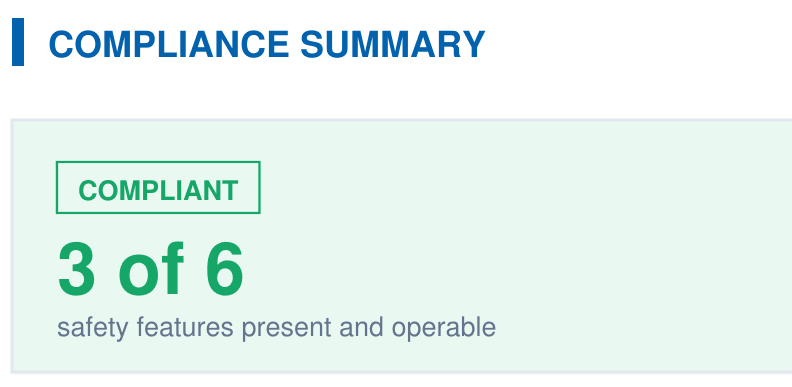
A branded PDF with the compliance summary, the feature table, each finding with its photos, and the signature, generated on‑site when the BPC §7195 and HSC §115922 checklist is complete.