Pool Inspection Checklist Software: Features & Benefits
Compare digital pool inspection checklist software options. Features, pricing, California BPC §7195 compliance templates, and implementation guide for pool inspectors.
Completing a thorough pool safety inspection requires checking dozens of compliance items, from barrier heights and gate mechanisms to drain covers and alarm functionality. Miss a single item on your checklist, and you risk incomplete inspections, compliance violations, or worse: liability if an accident occurs.
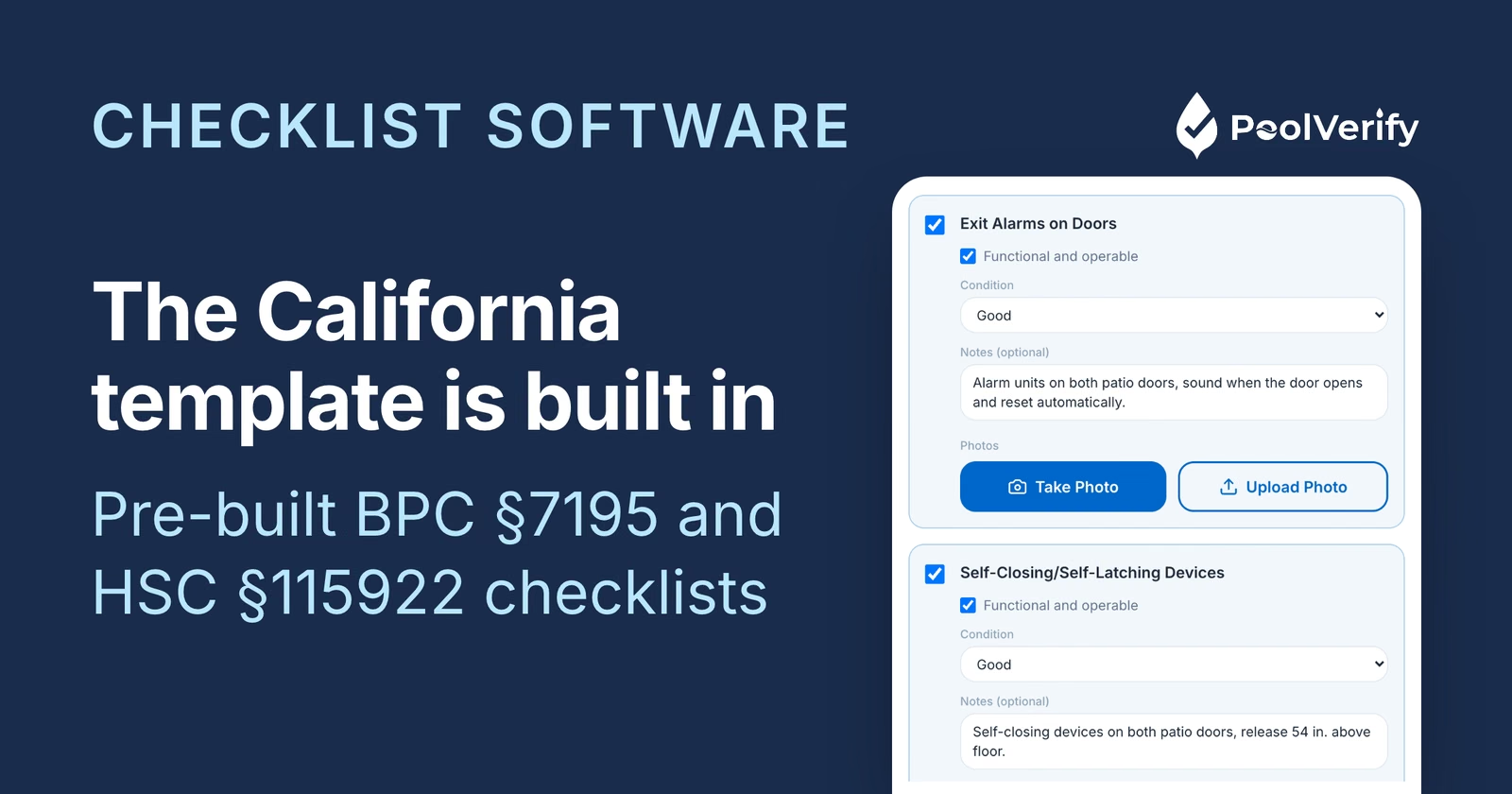
Digital pool inspection checklist software eliminates these risks by guiding inspectors through every required safety feature, capturing photo evidence, and generating compliant reports automatically. In 2026, California pool inspectors are moving away from paper checklists and adopting specialized software that ensures BPC §7195 and HSC §115922 compliance on every inspection.
This comprehensive guide compares digital checklist software options, breaks down essential features, explains California compliance capabilities, and shows you exactly what to expect during implementation.
Why use digital checklist software instead of paper
Paper checklists have served pool inspectors for decades, but digital checklist software offers measurable advantages that directly impact inspection quality, efficiency, and professionalism.
Never miss a compliance item
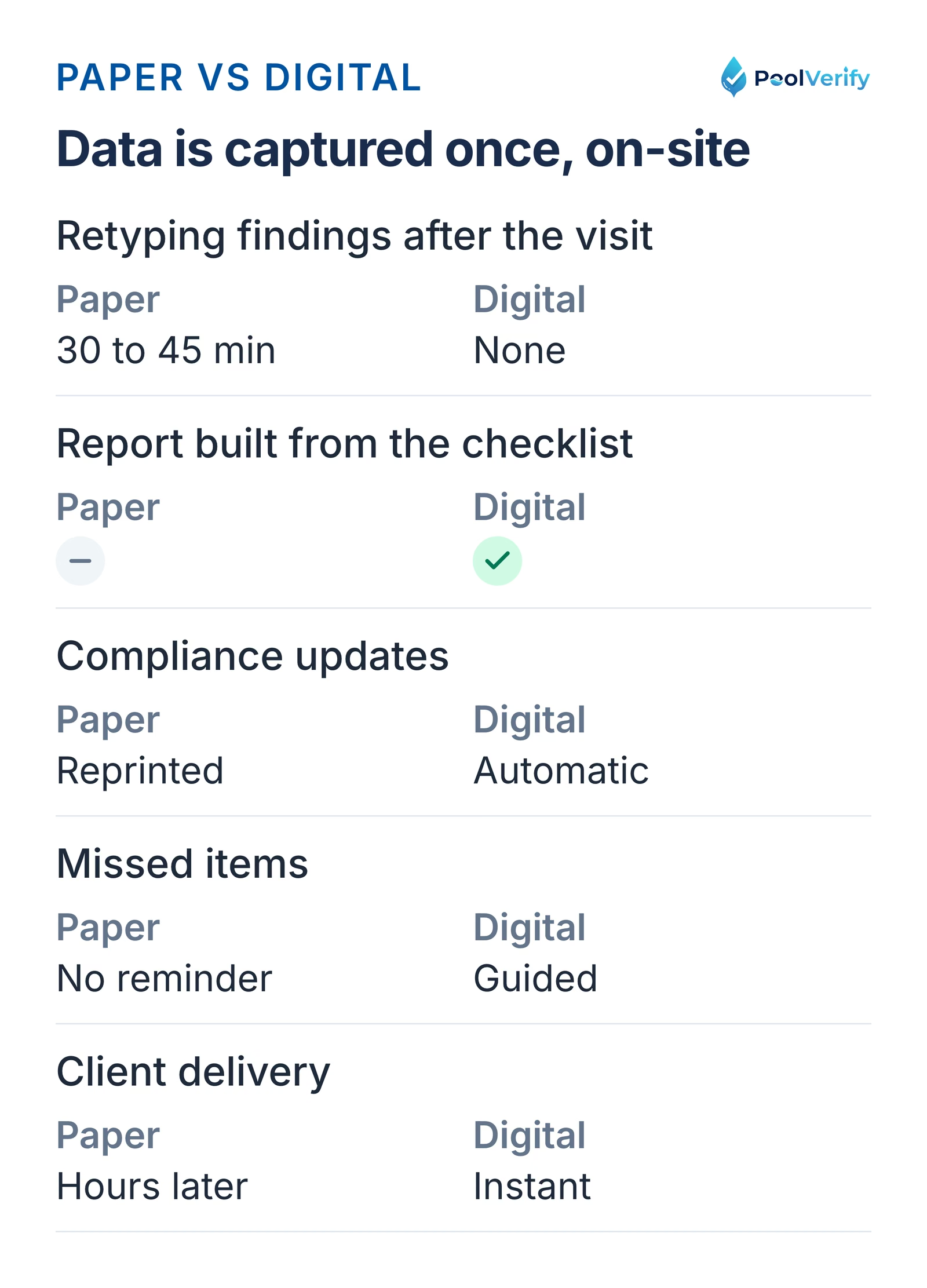
Paper checklists rely on memory and manual tracking. If you skip a page or forget to check a box, there's no automatic reminder. Digital checklist software guides you through every required item sequentially, preventing accidental omissions.
According to a 2026 study by SafetyCulture, inspectors using digital checklists complete 23% more inspection items on average compared to paper forms, with 89% fewer missed requirements.
Eliminate manual data entry
With paper checklists, you inspect on-site, return to the office, and spend 30-45 minutes manually typing findings into a report. Digital checklist software captures data once during the inspection and automatically populates your final report, saving hours of administrative work.
Paper checklists need 30 to 45 minutes of retyping per report, digital checklists populate the report automatically
Automatic compliance updates
California pool safety regulations change periodically. Paper checklists require manual updates, reprinting, and distribution. Digital checklist software providers update compliance templates automatically when regulations change, ensuring your inspections always meet current requirements.
When BPC §7195 was updated in 2025 to clarify self-latching gate requirements, digital software users received updated checklists immediately. Paper checklist users had to manually revise and reprint forms.
Professional client perception
Arriving at an inspection with a tablet or smartphone running professional checklist software projects competence and modernity. Paper clipboards signal outdated processes. In competitive markets, perception matters.
Real estate agents and property owners increasingly expect digital reports delivered instantly. Paper-based inspectors who email scanned documents or manually typed reports hours later lose business to digital competitors.
Ready to eliminate missed inspection items? PoolVerify's California-specific checklists guide you through every BPC §7195 requirement, capture photo evidence, and generate professional reports instantly. Start Your Free Trial
Key features to look for in checklist software
Not all digital checklist software is created equal. California pool inspectors should prioritize these essential features:
Sequential item guidance
The best checklist software presents inspection items in logical order, guiding you through the inspection from start to finish. Look for platforms that organize checklists by inspection area (barriers, gates, alarms, equipment) rather than displaying one long, unorganized list.
Essential capability: Skip logic that shows or hides checklist items based on previous answers. For example, if you mark "No pool cover present," the software should skip pool cover-specific checklist items automatically.
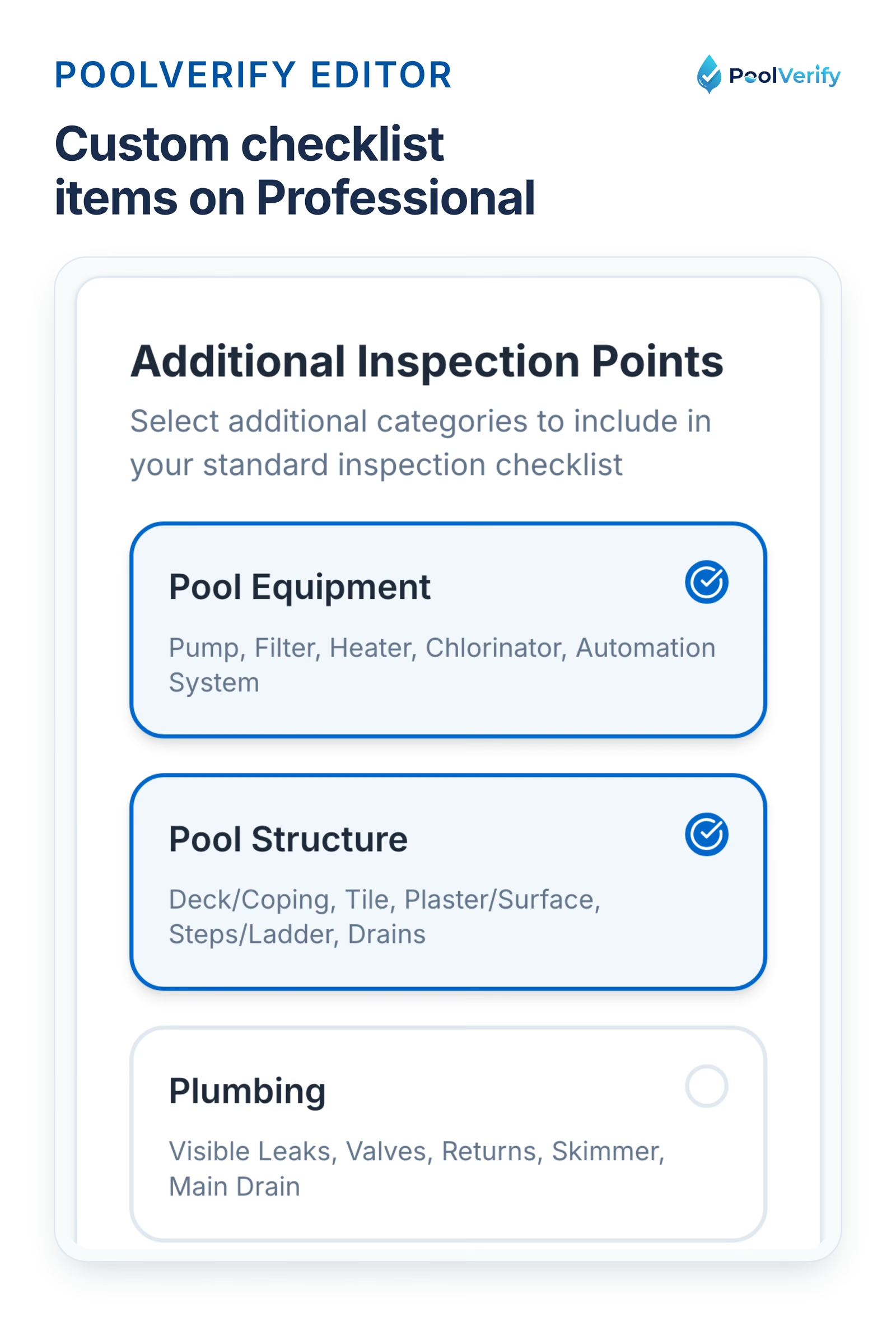
Customizable checklist templates
While pre-built templates ensure compliance, you'll need customization capabilities to:
Add property-specific notes fields
Include local jurisdiction requirements beyond state law
Create branded checklists with your company logo
Adjust item order to match your inspection workflow
The PoolVerify custom checklist editor, available on the Professional and Business plans
Offline functionality
Pool inspections often occur in areas with poor cellular service. Your checklist software must work offline, storing inspection data locally and syncing to the cloud when connection returns.
According to eAuditor Inspections, offline capability is the second most requested feature (after photo integration) among pool inspectors.
Mobile-optimized interface
Checklist software should be designed for touch input on tablets and smartphones, not desktop computers. Look for:
Large touch targets for checkbox selection
Swipe gestures for navigation
Responsive design that works on any screen size
No app store downloads required (responsive web apps)
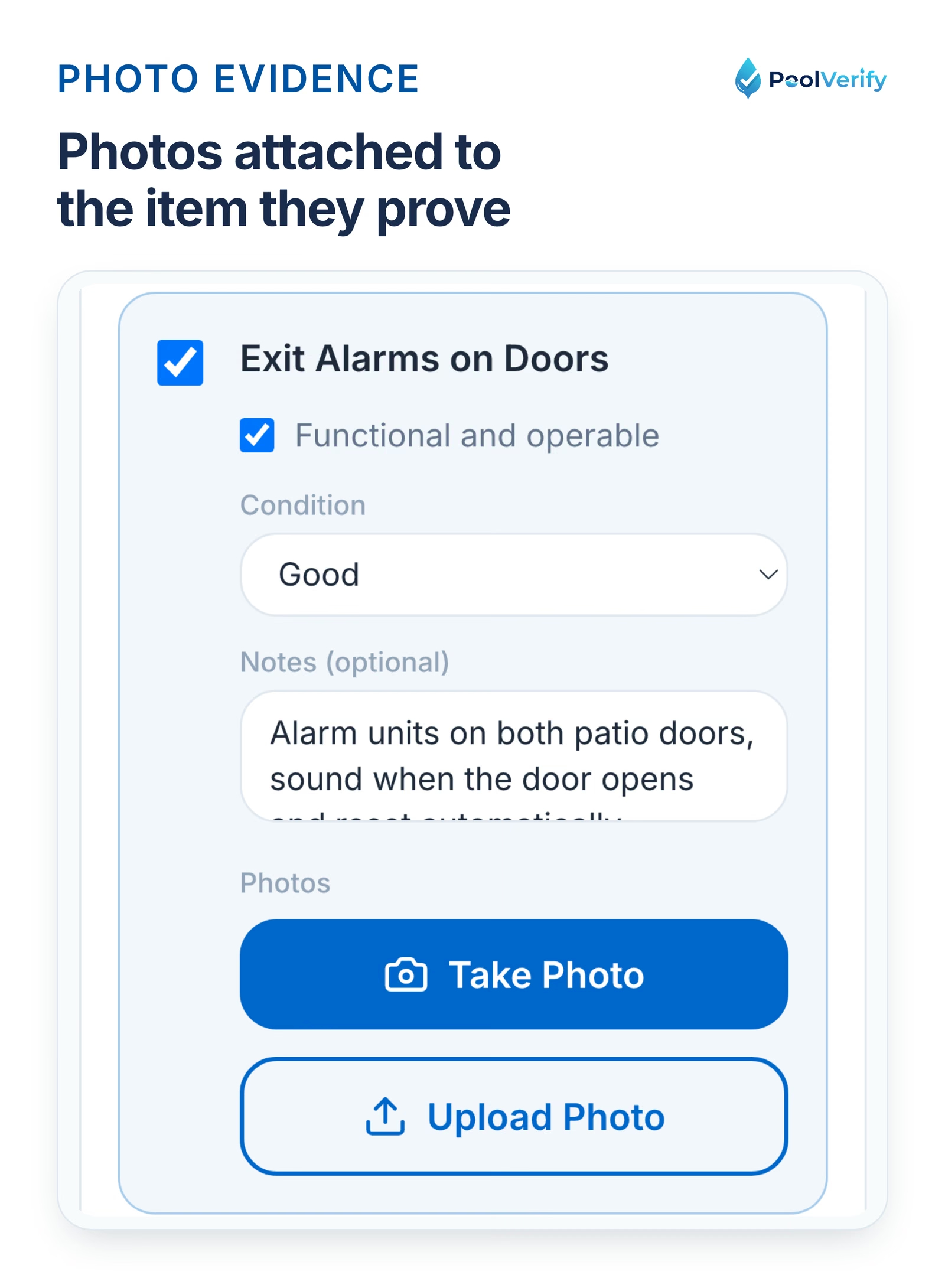
Photo attachment per checklist item
Each checklist item should allow multiple photo attachments. For example, your "Self-Closing Gate Mechanism" checklist item should support photos of the hinge, latch, and gate in both open and closed positions.
Premium platforms like SafetyCulture offer photo annotation tools that let you draw arrows or circles on photos to highlight specific issues.
Required vs optional items
California BPC §7195 inspections require specific safety features, while other items may be optional best practices. Your checklist software should distinguish between:
Required items (must be checked to complete inspection)
Optional items (best practice recommendations)
Conditional items (required only if certain conditions exist)
Pass/fail status per item
Each checklist item should support multiple status options:
This granularity allows detailed compliance tracking and helps property owners prioritize repairs.
California compliance: BPC §7195 and HSC §115922 checklists
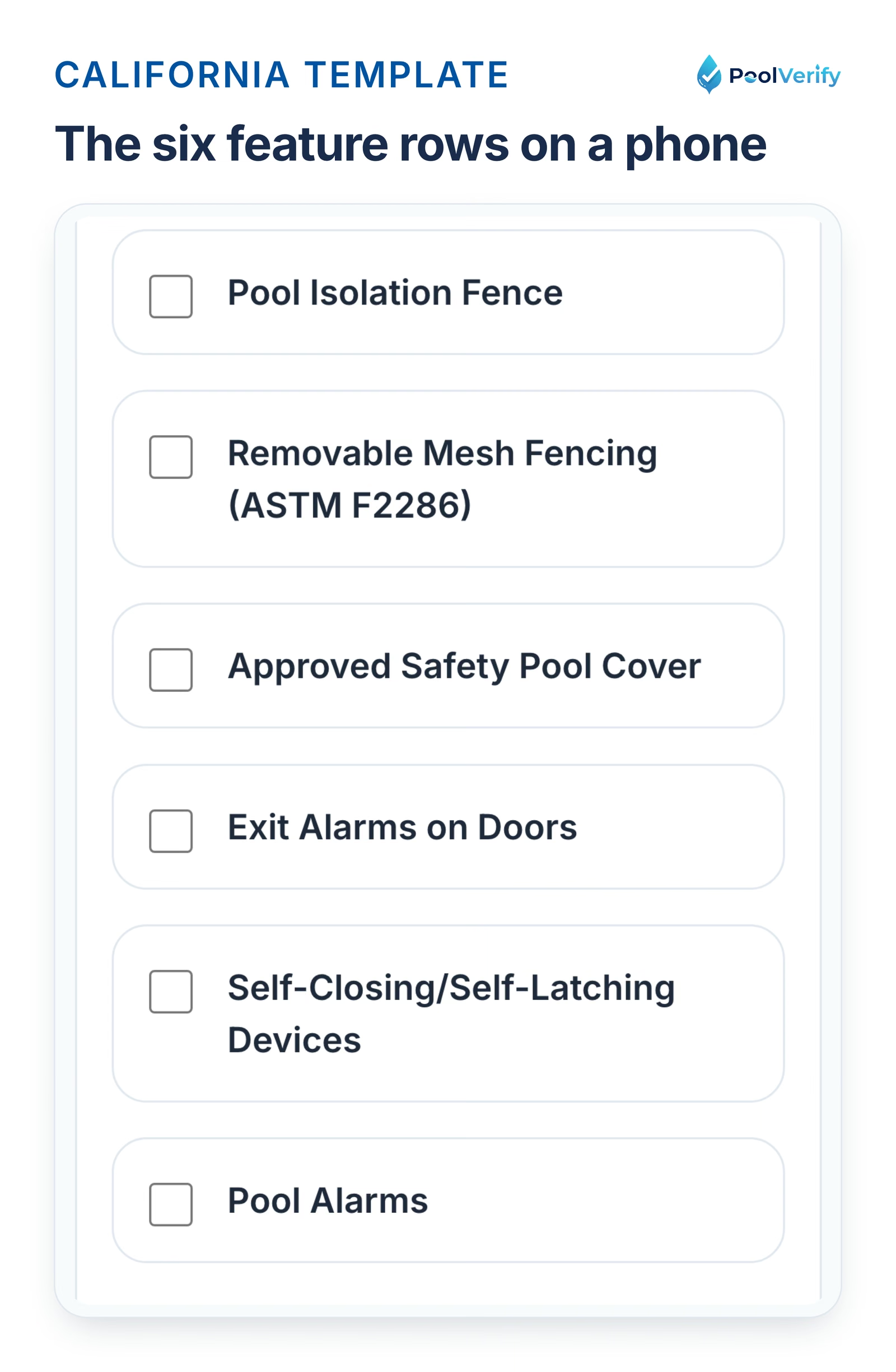
California pool safety inspections during property transfers must comply with two key regulations: BPC §7195 (pool safety inspection requirements) and HSC §115922 (drowning prevention safety features).
Drain cover condition (no cracks, damage, or missing)
Multiple drains or SVRS (Safety Vacuum Release System)
Drain spacing (minimum 3 feet apart if multiple drains)
Drain cover labeling (visible ANSI/APSP-16 stamp)
Professional pool inspection checklist software includes photo prompts for drain cover certification stamps, ensuring inspectors capture required documentation.
Local jurisdiction requirements
Some California cities and counties add requirements beyond state law. For example, Los Angeles County requires additional pool barrier spacing specifications in certain areas.
Advanced checklist software allows you to create jurisdiction-specific templates or add custom checklist items to address local requirements.
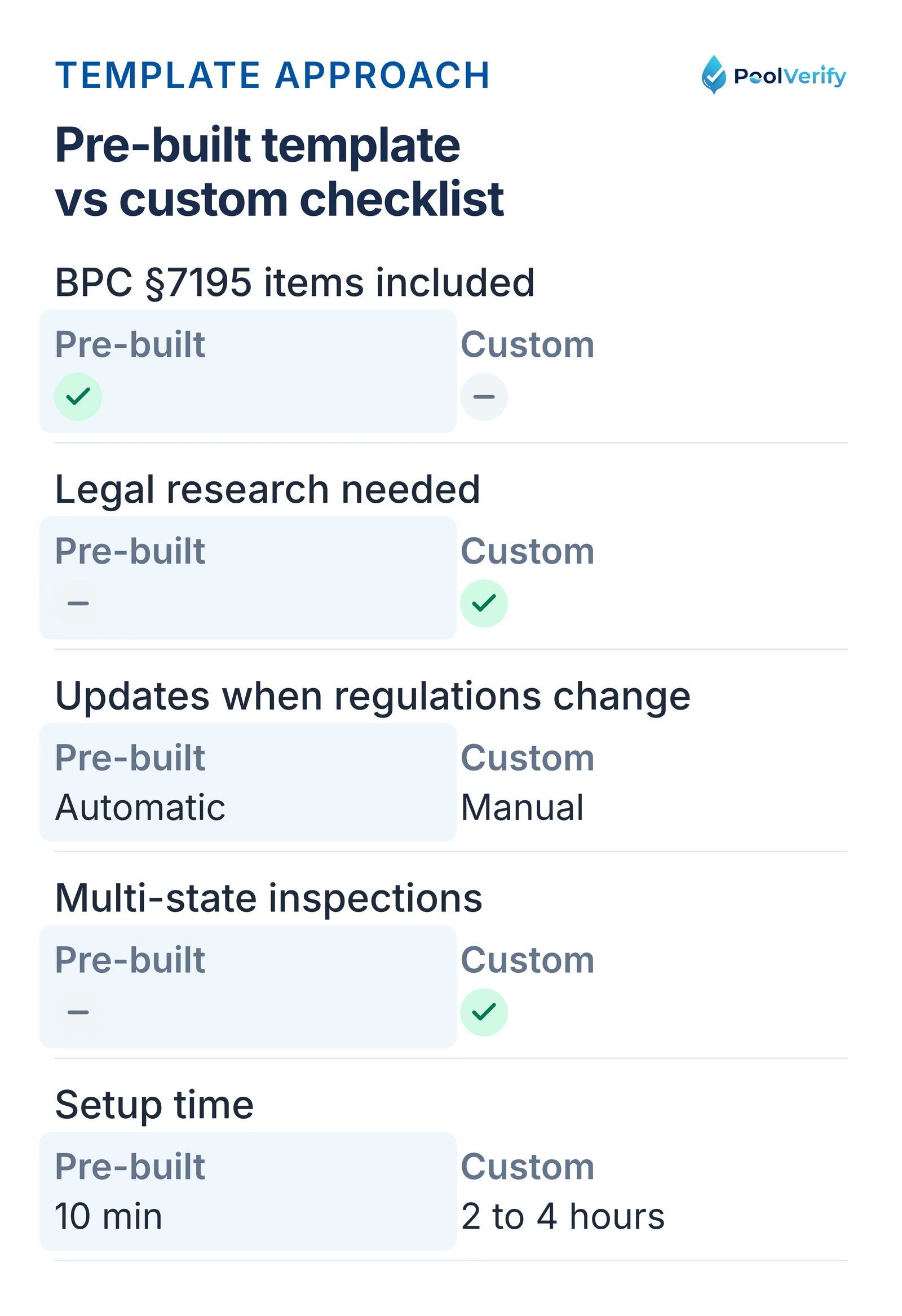
Pre-built compliance templates vs custom checklists
When evaluating pool inspection checklist software, you'll encounter two approaches: platforms with pre-built California compliance templates, and platforms requiring manual checklist creation.
Pre-built California compliance templates
Platforms: PoolVerify (California-specific)
Advantages:
Instant setup, start inspections in 10 minutes
Guaranteed BPC §7195 and HSC §115922 compliance
No legal research required
Lower liability risk from missed requirements
Disadvantages:
Less flexibility for unique inspection processes
May include items not relevant to your market
Customization options may be limited
Best for: Pool inspectors focused exclusively on California pool safety inspections who want guaranteed compliance without manual setup.
Custom checklist creation
Platforms: Spectora, HappyCo, ISN, HomeGauge, GoCanvas, FastField Forms
Advantages:
Complete control over checklist items and order
Support for multi-state inspections
Adaptable to any inspection type (pool, home, commercial)
Can create highly specialized checklists
Disadvantages:
Requires manual research of California requirements
Time-consuming initial setup (2-4 hours minimum)
Risk of missing required compliance items
Must manually update when regulations change
Higher liability risk if checklist is incomplete
Best for: Multi-state inspectors, home inspectors adding pool services, or inspectors with unique processes requiring extensive customization.
Pre-built California templates are ready in 10 minutes, custom checklists take 2 to 4 hours and manual legal research
Hybrid approach
Some platforms offer pre-built templates that can be customized. This provides the best of both worlds: guaranteed baseline compliance with flexibility to add unique items.
When evaluating software, ask:
"Do you provide California BPC §7195-compliant templates out of the box?"
"Can I add custom checklist items to pre-built templates?"
"How do you handle compliance updates when regulations change?"
Photo documentation integration
Photo documentation is critical for California pool safety inspections. Your checklist software should seamlessly integrate photo capture with each checklist item.
Photo capture per checklist item
The best implementations allow you to attach photos directly to specific checklist items as you complete the inspection. For example:
According to FastField Forms, photo documentation is now standard practice, especially for high-value properties or inspections with compliance requirements.
Photo-based evidence documentation
California courts have increasingly relied on photo evidence in pool safety liability cases. Your checklist software should create a defensible record showing:
What you inspected
When you inspected it (timestamp)
What condition you found (photo evidence)
What recommendations you made (report documentation)
Photo thumbnails with captions attached to one checklist item in PoolVerify, up to 10 per item
Automatic photo organization
Paper-based inspections require manual photo organization, downloading from camera, renaming files, and attaching to reports. Digital checklist software organizes photos automatically by:
Property address
Inspection date
Checklist section
Specific checklist item
This eliminates hours of post-inspection administrative work and reduces errors from mismatched photos.
Automatic report generation from checklists
The primary value proposition of digital checklist software is automatic report generation. As you complete checklist items on-site, the software builds your inspection report in real-time.
How automatic report generation works
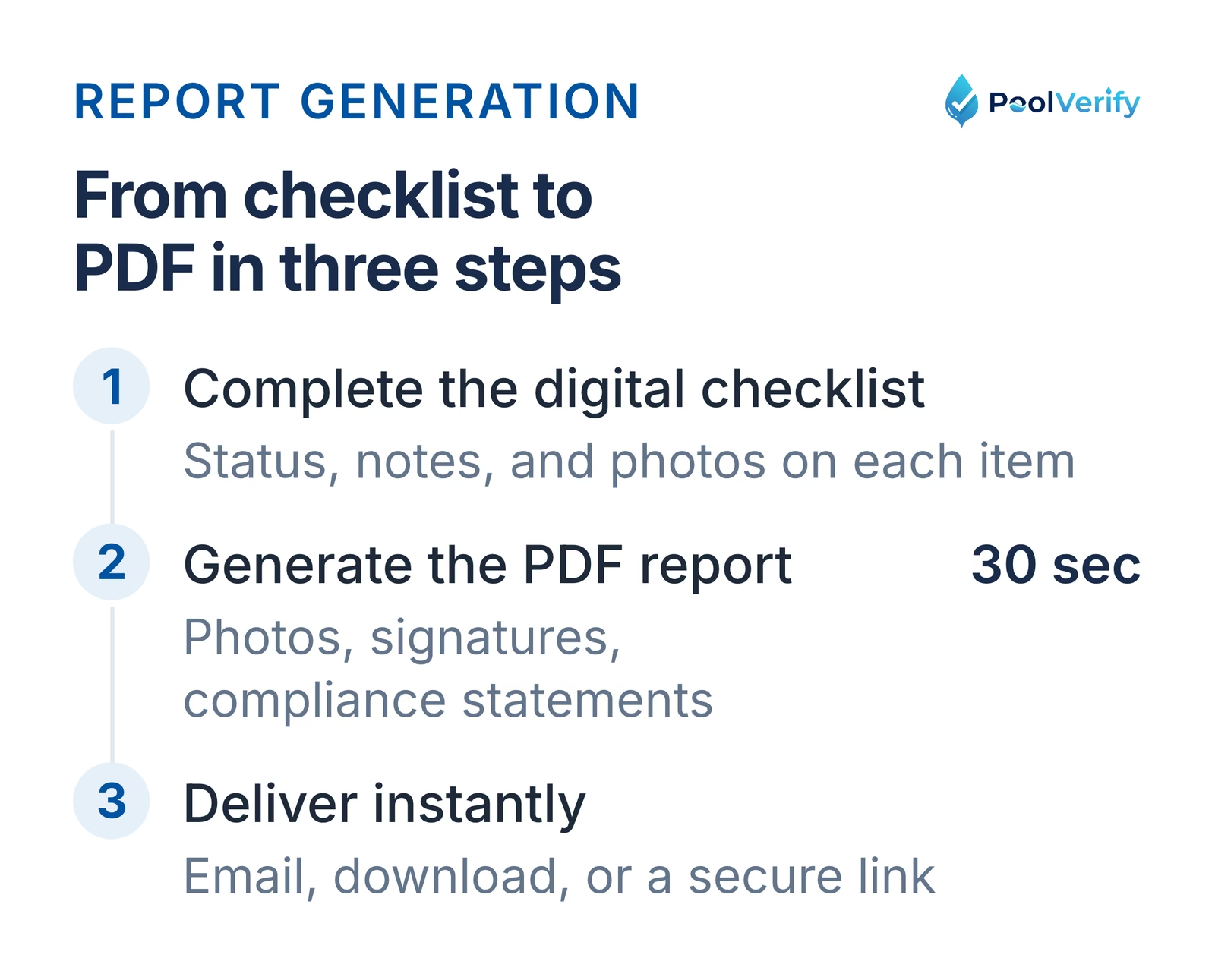
Step 1: Complete digital checklist As you check off items, mark pass/fail status, add notes, and attach photos, the software captures all data in a structured database.
Step 2: Generate PDF report When inspection is complete, click "Generate Report." The software automatically:
Formats checklist data into professional sections
Embeds photos next to relevant findings
Includes digital signatures (inspector and client)
Adds compliance statements and disclaimers
Creates table of contents and summary
Step 3: Instant delivery PDF reports are generated in seconds (not hours) and can be:
Emailed directly to clients
Downloaded for local storage
Uploaded to cloud storage automatically
Shared via secure link
Automatic report generation: complete the checklist, generate the PDF in 30 seconds, deliver by email or secure link
Report customization options
While automatic generation is standard, look for software that allows report customization:
Branding: Add your company logo, colors, and contact information
Section order: Rearrange report sections to match your preference
Custom disclaimers: Include California-specific legal language
Summary formats: Choose between detailed findings or executive summaries
Compliance certifications: Add certification stamps or inspector credentials
Report templates for different clients
Professional checklist software supports multiple report templates for different client types:
Real estate agents: Streamlined, client-friendly language
Property owners: Detailed repair recommendations
Pool service companies: Technical specifications and part numbers
Legal/insurance: Comprehensive documentation with all photos
California compliance reporting requirements
BPC §7195 requires inspection reports to specifically identify:
Which of the seven drowning prevention safety features are present
Whether each feature is in good repair
Whether each feature is operable as designed
If fewer than two safety features exist (must be stated)
Your checklist software must generate reports meeting these requirements to ensure California compliance.
Generate California-compliant reports in 30 seconds PoolVerify's checklist software automatically creates BPC §7195-compliant reports with photos, signatures, and required compliance statements. Try PoolVerify Free
Top pool inspection checklist software platforms
Based on features, California compliance capabilities, and user feedback, here are the leading pool inspection checklist software platforms in 2026:
1. PoolVerify, Best for California pool inspections
PoolVerify is the only platform built exclusively for California pool safety inspections, offering pre-built BPC §7195 and HSC §115922 checklists.
Checklist features:
Pre-built California compliance templates (BPC §7195, HSC §115922)
Sequential item guidance with skip logic
Photo attachment per checklist item (up to 10 photos)
Pass/fail status with notes field
Offline functionality with auto-sync
Automatic report generation (30-second PDF creation)
Pricing: $49-$199/month | Free trial: 14 days (no credit card to start)
Best for: Pool-only inspectors focused on California compliance
SafetyCulture is a comprehensive inspection management platform with AI-powered features and 30,000+ template library.
Checklist features:
30,000+ pre-built templates (general, not pool-specific)
Photo annotations with markup tools
AI-powered report summaries
Offline mode
Automatic report generation
Pricing: Free tier available, paid plans start at $19/user/month
Best for: Multi-industry inspectors or large inspection companies
Implementation time: 3-4 hours (adapting general templates to pool inspections)
5. FastField Forms, Digital inspection forms
FastField Forms provides digital inspection forms with rich data capture including photos, videos, and audio.
Checklist features:
Photos, videos, audio documentation
GPS location stamping
Timestamp capture
Offline functionality
Custom form builder
Pricing: Not publicly disclosed | Free trial: Available
Best for: Inspectors wanting multimedia documentation capabilities
Implementation time: 2-3 hours (manual form creation required)
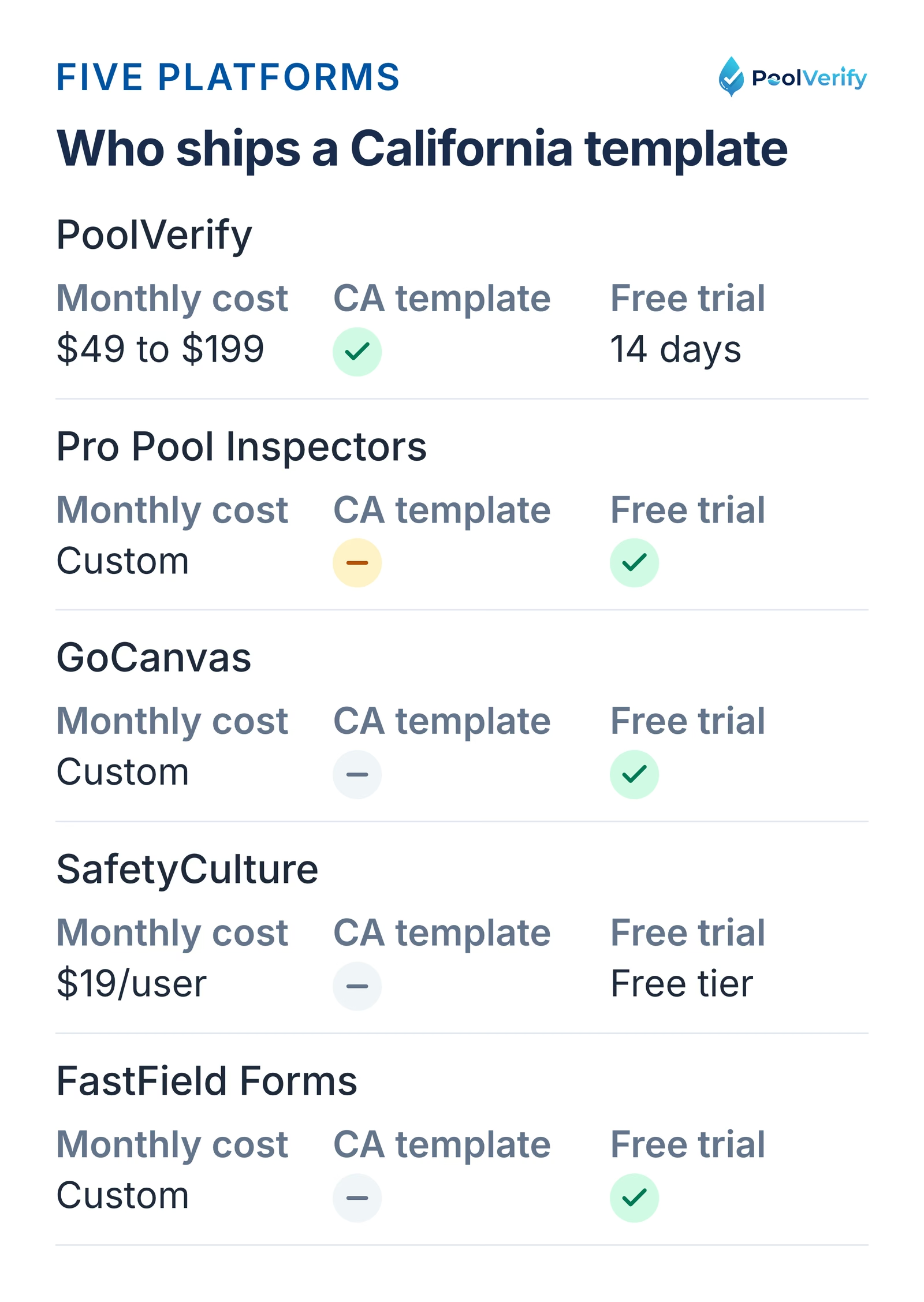
Five checklist platforms compared on monthly cost, pre-built California template, and free trial
Pricing comparison for checklist software
Pool inspection checklist software pricing varies significantly based on features, inspection volume, and compliance capabilities:
Platform
Monthly Cost
Inspection Volume
California Templates
Free Trial
PoolVerify
$49-$199
Unlimited (Pro+)
Yes Pre-built
14 days
Pro Pool Inspectors
Custom pricing
Varies
Partial Customizable
Yes
GoCanvas
Custom pricing
Varies
No Manual creation
Yes
SafetyCulture
$19-$99/user
Unlimited
No Manual creation
Free tier
FastField Forms
Custom pricing
Varies
No Manual creation
Yes
Cost considerations beyond subscription
When calculating total cost, consider:
Time savings value: If digital checklists save 60 minutes per inspection and you complete 20 inspections/month, that's 20 hours saved monthly. At $50/hour value, that's $1,000/month in recovered time.
Storage costs: Some platforms charge extra for cloud storage beyond base allowance. PoolVerify includes 500MB-100GB depending on plan.
Training time: Platforms requiring custom checklist creation cost 2-4 hours of setup time ($100-200 value).
Compliance risk: Using software without California-specific templates increases risk of missed requirements and potential liability.
ROI calculation
For a solo California pool inspector completing 20 inspections/month:
PoolVerify Professional ($99/month):
Time saved: 20 hours/month × $50/hour = $1,000/month
Time saved: 18 hours/month × $50/hour = $900/month (less efficient without pre-built templates)
Software cost: -$50/month
Setup cost: -$200 (one-time)
Net benefit: $850/month first month, then $850/month ($10,000/year)
The math clearly favors digital checklist software regardless of platform, with California-specific platforms offering slightly higher ROI through faster inspections and lower setup costs.
Implementation time and training
One of the biggest concerns when switching to digital checklist software is implementation time. How long before you're productive?
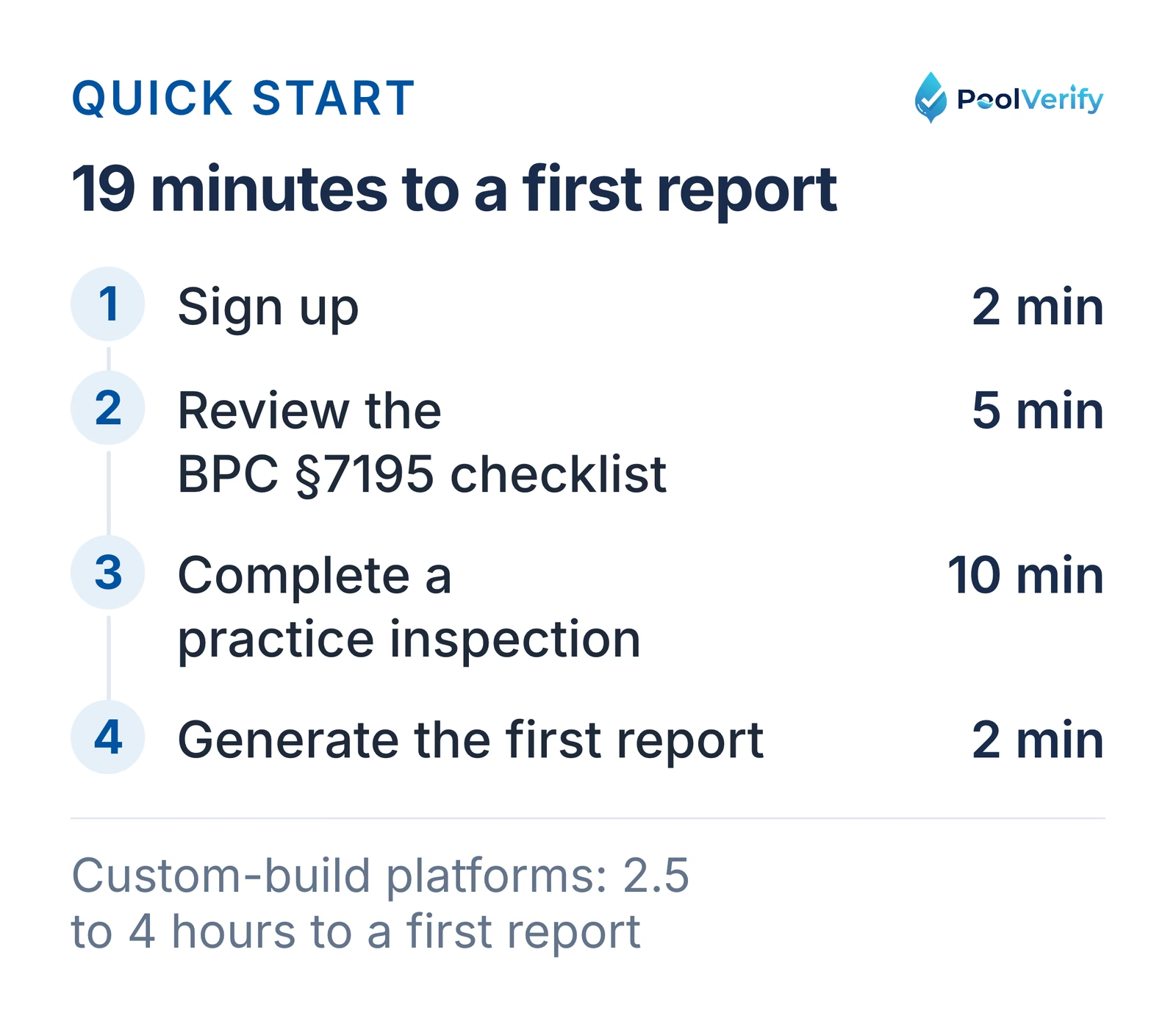
Quick-start platforms (10-30 minutes)
PoolVerify (California-specific):
Sign up: 2 minutes
Review pre-built BPC §7195 checklist: 5 minutes
Complete practice inspection: 10 minutes
Generate first report: 2 minutes
Total: 19 minutes to first report
Pre-built compliance templates eliminate setup time. You can start real inspections immediately.
Custom platforms require significant upfront investment to create California-compliant checklists.
PoolVerify quick start: sign up, review the BPC §7195 checklist, practice inspection, first report in 19 minutes
Training requirements
Self-guided training (most platforms):
Video tutorials: 15-30 minutes
Documentation review: 15-30 minutes
Practice inspections: 30-60 minutes
Total: 1-2 hours
Live training (enterprise platforms):
Onboarding call: 30-60 minutes
Platform walkthrough: 30-60 minutes
Custom template setup: 60-120 minutes
Total: 2-4 hours
Most pool inspectors prefer self-guided training with video tutorials. Complex platforms requiring live training signal unnecessary complexity for straightforward pool inspections.
Time to full productivity
How long until digital checklists feel faster than paper?
First inspection: Slower (learning new interface)
Second inspection: Similar speed to paper
Third inspection: Slightly faster than paper
Fifth inspection: Significantly faster than paper
Most inspectors report full productivity by their third digital inspection, with time savings becoming obvious by inspection five.
Mobile device considerations
Digital checklist software works on:
Tablets (iPad, Android tablets): Best for on-site use
Smartphones (iPhone, Android): Portable but smaller screen
Laptops: Good for review and report generation, awkward for on-site checklists
Budget for a tablet ($200-500) if you don't already own one. The investment pays for itself within the first month through time savings.
Choosing the right checklist software
Follow this decision framework to select the best pool inspection checklist software for your business:
Step 1: Define your inspection focus
California pool inspections only
Choose PoolVerify for pre-built BPC §7195 compliance
Multi-state pool inspections
Choose Pro Pool Inspectors or custom platforms
General home inspections including pools
Choose Spectora or HomeGauge
Property management inspections
Choose HappyCo or SafetyCulture
Step 2: Evaluate compliance requirements
BPC §7195 compliance is critical
Pre-built California templates are non-negotiable (PoolVerify)
Compliance is important but not exclusive
Custom platforms with checklist builder (GoCanvas, FastField)
If net benefit exceeds $500/month, the decision is straightforward. If benefit is marginal ($50-200/month), prioritize ease of use and compliance features over cost.
Step 5: Try before you buy
All platforms offer free trials:
PoolVerify: 14-day trial (no credit card to start)
SafetyCulture: Free tier available
Pro Pool Inspectors: Free trial available
GoCanvas: Free trial available
Test the platform on real inspections before committing. Evaluate:
Photo integration ease (how many taps to add photo?)
Report quality (professional appearance?)
Report generation speed (instant or minutes?)
Mobile usability (easy to use on-site?)
Limitations
This guide is general information about pool safety law, not legal advice; the current text of HSC §115922 and BPC §7195 on leginfo.legislature.ca.gov controls, and local building departments add their own requirements. PoolVerify is inspection software for California residential pool safety inspections; it does not perform inspections, certify inspectors, or issue compliance certificates.
Frequently asked questions
What is pool inspection checklist software?
Pool inspection checklist software is a digital platform that guides inspectors through required safety items, captures photo evidence, and automatically generates professional inspection reports. It replaces paper checklists and manual report typing with mobile-optimized checklists and instant PDF generation. The best platforms include California-specific BPC §7195 and HSC §115922 compliance templates.
Do I need special software for California pool inspections?
California pool inspections require assessment of seven specific drowning prevention safety features per BPC §7195 and HSC §115922. While generic inspection software can be customized for California requirements, platforms with pre-built California templates (like PoolVerify) ensure compliance, reduce setup time, and lower liability risk from missed items.
How much does pool inspection checklist software cost?
Pool inspection checklist software costs $49-$199/month depending on features and inspection volume. PoolVerify starts at $49/month for 25 inspections, while professional plans with unlimited inspections cost $99-$199/month. Generic platforms like SafetyCulture start at $19/user/month but require manual checklist creation. Most platforms offer 14-30 day free trials.
Can I use pool inspection checklist software offline?
Most native platforms do, including Pro Pool Inspectors, GoCanvas, SafetyCulture, and FastField Forms: you complete checklists and capture photos without a connection and the data syncs later. PoolVerify does not have an offline mode today; it needs a connection and saves each answer and photo to the cloud as you go.
How long does it take to implement checklist software?
Implementation time depends on whether the platform offers pre-built California templates. PoolVerify with pre-built BPC §7195 checklists is ready in 10-20 minutes. Generic platforms requiring custom checklist creation take 2-4 hours to set up California-compliant templates. Most inspectors reach full productivity by their third digital inspection.
What's the difference between pre-built and custom checklists?
Pre-built checklists include California BPC §7195 and HSC §115922 compliance items out-of-the-box, allowing immediate use with guaranteed compliance. Custom checklists require manual creation of all inspection items, taking 2-4 hours but offering maximum flexibility. Pre-built platforms automatically update when regulations change; custom platforms require manual updates.
Do I need a tablet or can I use my phone?
Pool inspection checklist software works on tablets, smartphones, and laptops. Tablets (iPad, Android) offer the best balance of portability and screen size for on-site inspections. Smartphones work but have smaller screens that make checklist navigation more difficult. Most professional inspectors prefer tablets ($200-500) for optimal usability.
How many photos can I attach per checklist item?
Photo limits vary by platform. PoolVerify allows up to 10 photos per checklist item, which is sufficient for most California pool safety inspections. Enterprise platforms like SafetyCulture support unlimited photos per item. Budget platforms may limit photos to 1-3 per item. California inspections typically require 15-30 photos total, with multiple photos per critical safety feature.
Ready to streamline your pool inspections with digital checklists?
Digital pool inspection checklist software transforms inspection efficiency, compliance accuracy, and professional presentation. California pool inspectors switching from paper checklists to digital platforms report:
60 minutes saved per inspection (eliminating manual report typing)
23% more inspection items completed (guided sequential checklists)
The choice between platforms depends on your inspection focus:
For California pool-only inspections: PoolVerify offers pre-built BPC §7195 and HSC §115922 checklists, 10-minute setup, and the lowest learning curve at $49-$199/month.
For multi-inspection businesses: Spectora or HomeGauge support home, radon, and pool inspections with custom checklist builders.
For property management: HappyCo or SafetyCulture scale for large property portfolios.
Don't waste another 60 minutes manually typing inspection reports or risk missing required BPC §7195 compliance items with incomplete checklists. Start your free trial today and experience the efficiency of digital checklist software.
Complete California pool inspections in 20 minutes with pre-built checklists PoolVerify's BPC §7195-compliant checklists guide you through every required safety feature, capture photo evidence, and generate professional reports instantly. Try PoolVerify Free for 14 Days
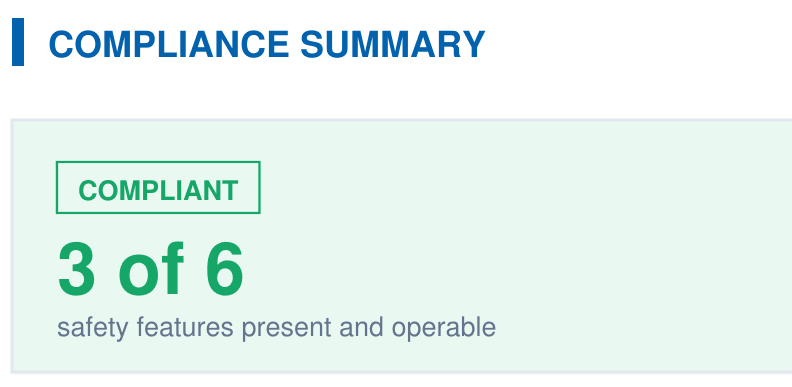
A branded PDF with the compliance summary, the feature table, each finding with its photos, and the signature, generated on‑site when the BPC §7195 and HSC §115922 checklist is complete.